> ## Documentation Index
> Fetch the complete documentation index at: https://www.thundercompute.com/docs/llms.txt
> Use this file to discover all available pages before exploring further.
# Run Qwen3.6 27B
> Launch Qwen3.6 27B dense on Thunder Compute with a GPU-fitting quantization, tested llama.cpp commands, and OpenAI-compatible access.
Qwen3.6 27B is a dense model from Qwen with a 262,144 token native context window and an Apache 2.0 license. This guide uses a tested RTX A6000 setup with a GGUF quantization, 32K context, full GPU offload, and a public OpenAI-compatible endpoint.
The tested path uses [Unsloth's Qwen3.6 27B GGUF files](https://huggingface.co/unsloth/Qwen3.6-27B-GGUF) with the current `llama.cpp` CUDA Docker image. For H100 serving, use the official [Qwen3.6 27B FP8 checkpoint](https://huggingface.co/Qwen/Qwen3.6-27B-FP8) with vLLM.
Ollama is a separate quick-start path: `ollama run qwen3.6:27b` pulls Ollama's official Q4\_K\_M build automatically. The screenshots and API commands below use llama.cpp instead, because that path makes the GGUF file, context length, server port, and OpenAI-compatible endpoint explicit.
## Tested Setup
The following configuration was used for the screenshots and command output in this guide.
| Thunder Compute GPU | Model file | Context | Runtime | Result |
| ------------------- | ---------------------------------------- | ------- | ---------------- | --------------------------------------------------------------------------- |
| RTX A6000 48 GB | `Qwen3.6-27B-UD-Q4_K_XL.gguf` (16.4 GiB) | `32768` | llama.cpp Docker | Runs successfully on the `base` template and serves `/v1/chat/completions`. |
With these settings, Qwen3.6 27B runs cleanly on a single A6000 as a 32K-context endpoint. The server command uses `--parallel 1` to start with one request slot; this controls request concurrency, not the number of GPUs.
## Scale Up Options
Use the A6000 path above when you want the exact configuration tested in this guide. Move to a larger GPU when you want to validate a higher-quality quantization, more simultaneous requests, or vLLM serving.
| Thunder Compute GPU | Model format to try next | Runtime | Why move up |
| ------------------- | -------------------------------------------------------- | --------- | ----------------------------------------------------------------------------- |
| A100 80 GB | `Qwen3.6-27B-UD-Q6_K_XL.gguf` or `Qwen3.6-27B-Q8_0.gguf` | llama.cpp | Higher-quality GGUF files and more context or batching headroom. |
| H100 80 GB | `Qwen/Qwen3.6-27B-FP8` | vLLM | Higher-throughput OpenAI-compatible serving with the official FP8 checkpoint. |
## Tested Generation Parameters
Qwen recommends different sampling settings for thinking and non-thinking use. The tested A6000 commands in this guide use non-thinking mode:
| Mode | Temperature | Top P | Top K | Presence penalty |
| ----------------------- | ----------- | ------ | ----- | ---------------- |
| Non-thinking/instruct | `0.7` | `0.80` | `20` | `1.5` |
| Thinking/general | `1.0` | `0.95` | `20` | `0.0` |
| Thinking/precise coding | `0.6` | `0.95` | `20` | `0.0` |
For non-thinking prompts, include `/no_think` at the start of the user message and set `--reasoning off` when you run `llama.cpp` server.
## Create The Instance
Create an A6000 development instance with enough disk space for the llama.cpp Docker image and the GGUF file:
```bash theme={null}
tnr create --mode development --gpu a6000 --vcpus 8 --template base --primary-disk 200
```
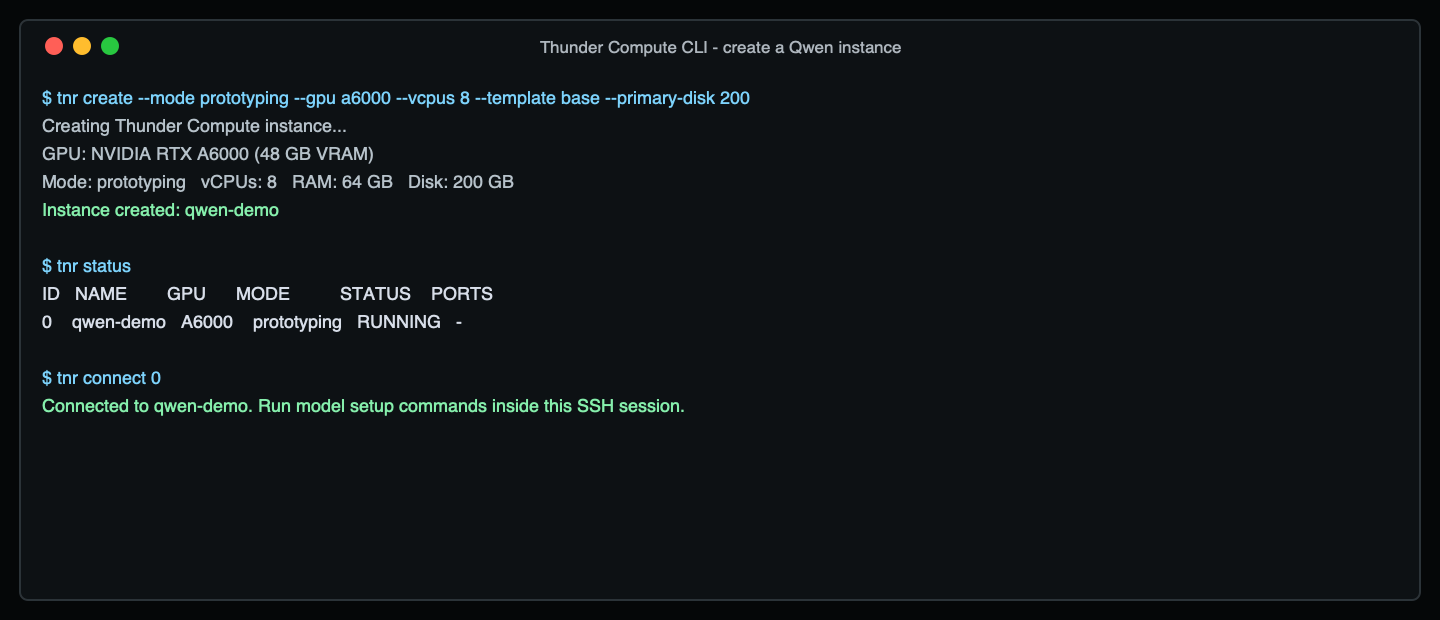 For an A100 or H100 run, keep the same shape but change the GPU. Available vCPU choices vary by current inventory, so use `tnr create` interactively if a one-line command needs adjustment.
```bash theme={null}
# A100 80 GB
tnr create --mode development --gpu a100 --num-gpus 1 --vcpus 12 --template base --primary-disk 250
# H100 80 GB
tnr create --mode development --gpu h100 --num-gpus 1 --vcpus 16 --template base --primary-disk 250
```
Connect to the instance:
```bash theme={null}
tnr status
tnr connect
```
## Download The A6000 GGUF
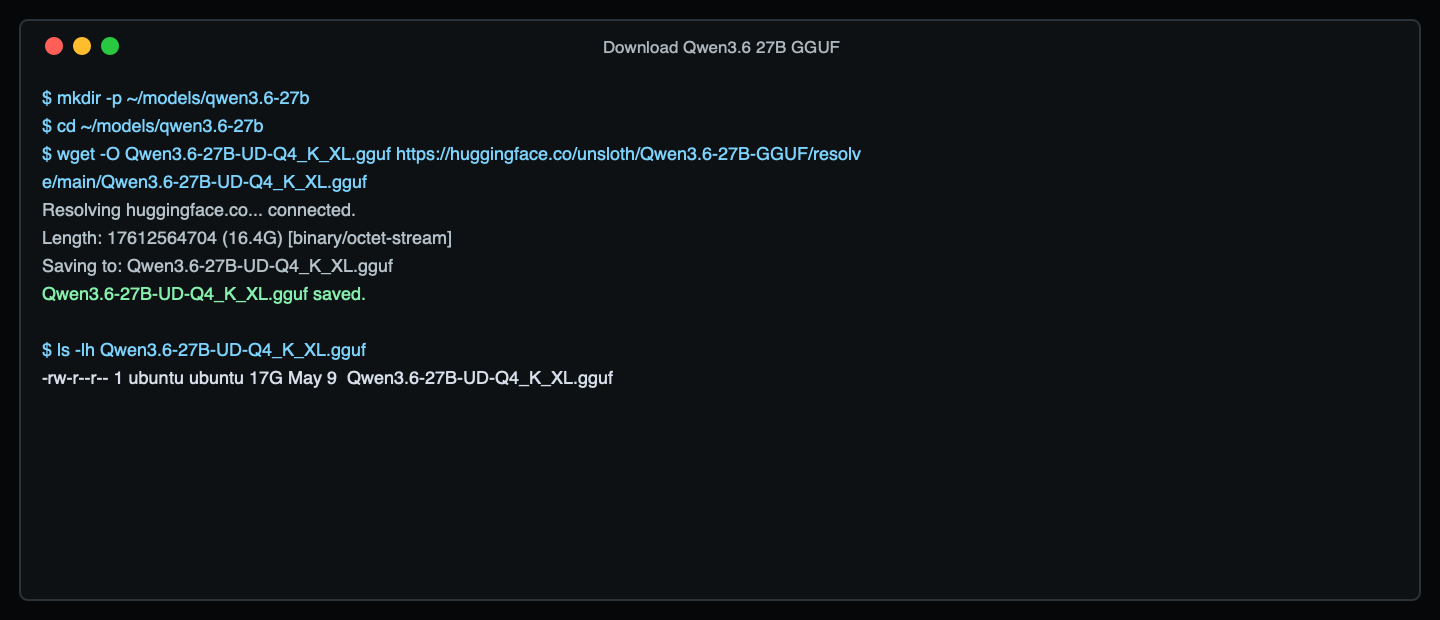
Inside the instance, download the `UD-Q4_K_XL` GGUF. This is the tested A6000 fit.
```bash theme={null}
mkdir -p ~/models/qwen3.6-27b
cd ~/models/qwen3.6-27b
wget -O Qwen3.6-27B-UD-Q4_K_XL.gguf \
https://huggingface.co/unsloth/Qwen3.6-27B-GGUF/resolve/main/Qwen3.6-27B-UD-Q4_K_XL.gguf
```
For an A100 or H100 run, keep the same shape but change the GPU. Available vCPU choices vary by current inventory, so use `tnr create` interactively if a one-line command needs adjustment.
```bash theme={null}
# A100 80 GB
tnr create --mode development --gpu a100 --num-gpus 1 --vcpus 12 --template base --primary-disk 250
# H100 80 GB
tnr create --mode development --gpu h100 --num-gpus 1 --vcpus 16 --template base --primary-disk 250
```
Connect to the instance:
```bash theme={null}
tnr status
tnr connect
```
## Download The A6000 GGUF
Inside the instance, download the `UD-Q4_K_XL` GGUF. This is the tested A6000 fit.
```bash theme={null}
mkdir -p ~/models/qwen3.6-27b
cd ~/models/qwen3.6-27b
wget -O Qwen3.6-27B-UD-Q4_K_XL.gguf \
https://huggingface.co/unsloth/Qwen3.6-27B-GGUF/resolve/main/Qwen3.6-27B-UD-Q4_K_XL.gguf
```
 For A100, replace the filename and URL with one of these:
```bash theme={null}
# Higher quality than Q4, still compact
Qwen3.6-27B-UD-Q6_K_XL.gguf
# Largest common GGUF choice for a single 80 GB card
Qwen3.6-27B-Q8_0.gguf
```
## Run A Direct Prompt
Set a short prompt for a direct model-load smoke test:
```bash theme={null}
PROMPT=$'<|im_start|>user\n/no_think\nIn one sentence, explain what a Thunder Compute GPU instance is.\n<|im_end|>\n<|im_start|>assistant\n'
```
Run the model with full GPU offload and the tested 32K context:
```bash theme={null}
sudo docker run --rm --device nvidia.com/gpu=all \
-v "$HOME/models/qwen3.6-27b:/models" \
ghcr.io/ggml-org/llama.cpp:full-cuda --run-legacy \
-m /models/Qwen3.6-27B-UD-Q4_K_XL.gguf \
-ngl 99 \
-c 32768 \
-n 160 \
--temp 0.7 \
--top-p 0.8 \
--top-k 20 \
--no-display-prompt \
--simple-io \
-no-cnv \
-p "$PROMPT"
```
For A100, replace the filename and URL with one of these:
```bash theme={null}
# Higher quality than Q4, still compact
Qwen3.6-27B-UD-Q6_K_XL.gguf
# Largest common GGUF choice for a single 80 GB card
Qwen3.6-27B-Q8_0.gguf
```
## Run A Direct Prompt
Set a short prompt for a direct model-load smoke test:
```bash theme={null}
PROMPT=$'<|im_start|>user\n/no_think\nIn one sentence, explain what a Thunder Compute GPU instance is.\n<|im_end|>\n<|im_start|>assistant\n'
```
Run the model with full GPU offload and the tested 32K context:
```bash theme={null}
sudo docker run --rm --device nvidia.com/gpu=all \
-v "$HOME/models/qwen3.6-27b:/models" \
ghcr.io/ggml-org/llama.cpp:full-cuda --run-legacy \
-m /models/Qwen3.6-27B-UD-Q4_K_XL.gguf \
-ngl 99 \
-c 32768 \
-n 160 \
--temp 0.7 \
--top-p 0.8 \
--top-k 20 \
--no-display-prompt \
--simple-io \
-no-cnv \
-p "$PROMPT"
```
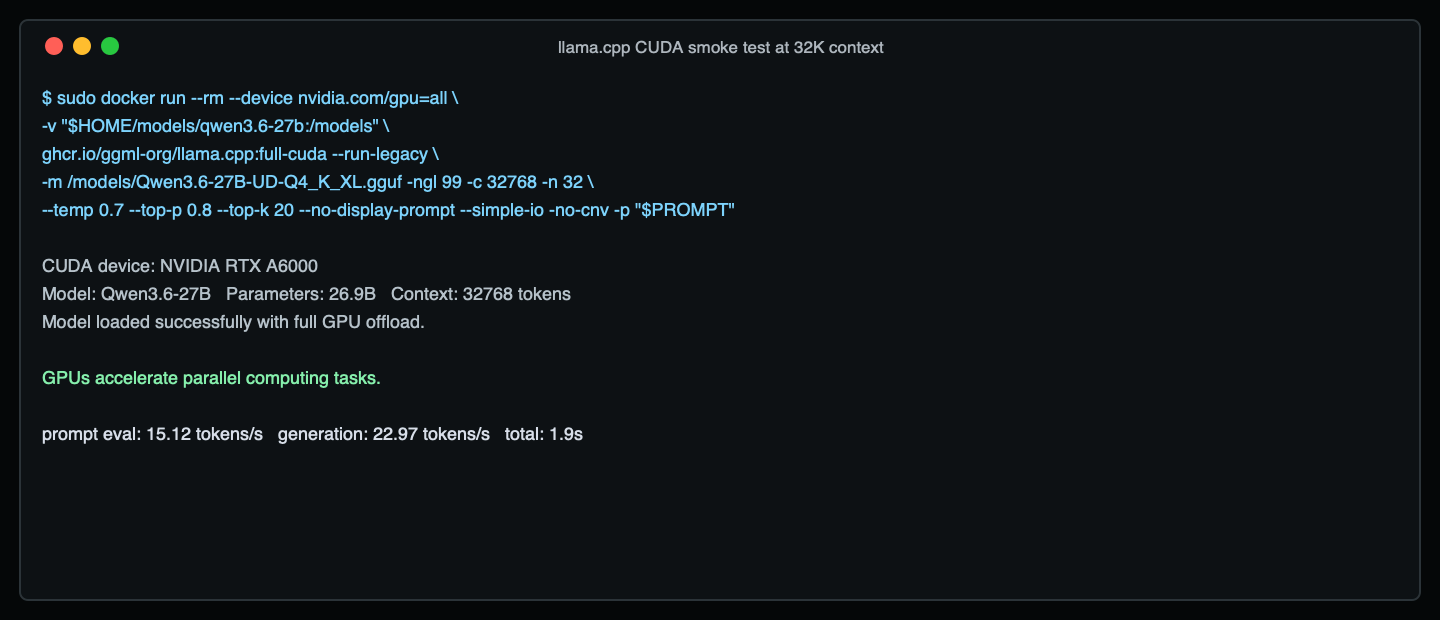 This direct run is only a quick check that the GGUF loads and generates on the selected GPU. If you are using a different GGUF file, update the `-m` path. If the command runs out of memory, lower `-c` first. If it succeeds and you need more context, raise `-c` and test again before turning the endpoint over to users.
## Start An OpenAI-Compatible API
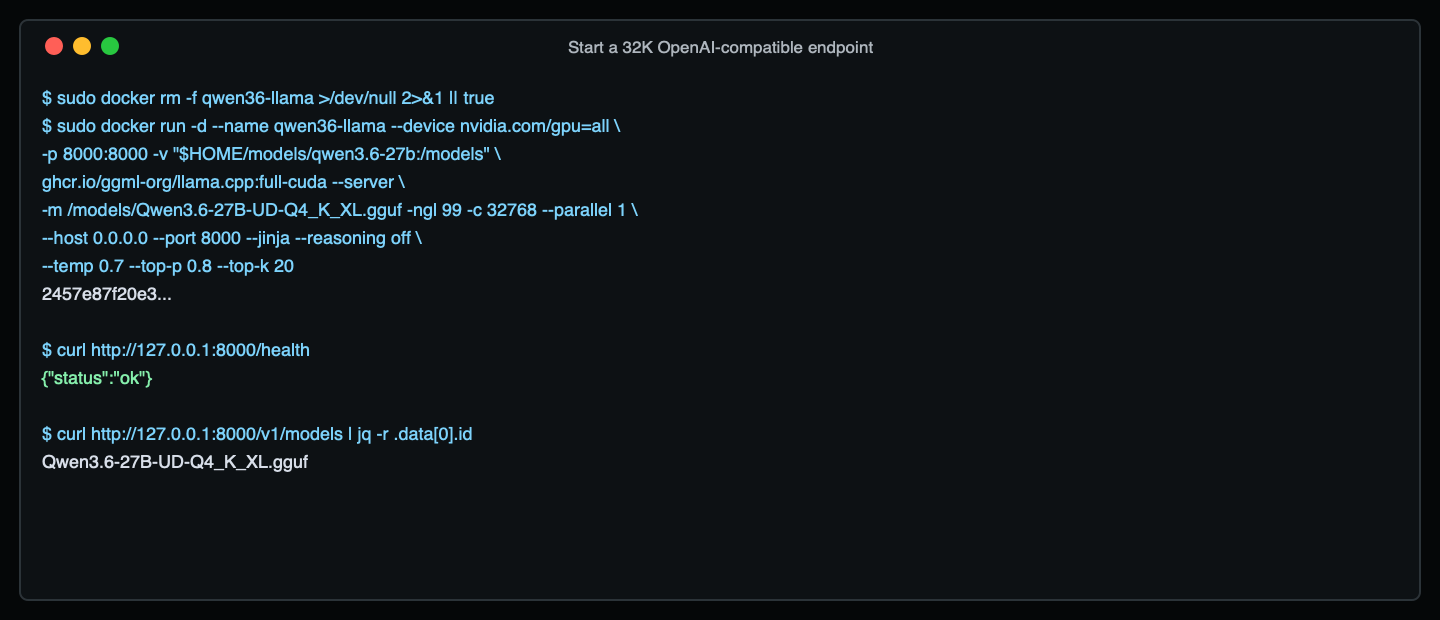
Start a persistent `llama.cpp` server on port `8000`:
```bash theme={null}
sudo docker rm -f qwen36-llama >/dev/null 2>&1 || true
sudo docker run -d \
--name qwen36-llama \
--device nvidia.com/gpu=all \
-p 8000:8000 \
-v "$HOME/models/qwen3.6-27b:/models" \
ghcr.io/ggml-org/llama.cpp:full-cuda --server \
-m /models/Qwen3.6-27B-UD-Q4_K_XL.gguf \
-ngl 99 \
-c 32768 \
--parallel 1 \
--host 0.0.0.0 \
--port 8000 \
--jinja \
--reasoning off \
--temp 0.7 \
--top-p 0.8 \
--top-k 20
```
Check that the server is ready:
```bash theme={null}
curl http://127.0.0.1:8000/health
curl http://127.0.0.1:8000/v1/models
```
The server is ready when `/health` returns `{"status":"ok"}`. You can use `/v1/models` as a quick check that the model is loaded.
This direct run is only a quick check that the GGUF loads and generates on the selected GPU. If you are using a different GGUF file, update the `-m` path. If the command runs out of memory, lower `-c` first. If it succeeds and you need more context, raise `-c` and test again before turning the endpoint over to users.
## Start An OpenAI-Compatible API
Start a persistent `llama.cpp` server on port `8000`:
```bash theme={null}
sudo docker rm -f qwen36-llama >/dev/null 2>&1 || true
sudo docker run -d \
--name qwen36-llama \
--device nvidia.com/gpu=all \
-p 8000:8000 \
-v "$HOME/models/qwen3.6-27b:/models" \
ghcr.io/ggml-org/llama.cpp:full-cuda --server \
-m /models/Qwen3.6-27B-UD-Q4_K_XL.gguf \
-ngl 99 \
-c 32768 \
--parallel 1 \
--host 0.0.0.0 \
--port 8000 \
--jinja \
--reasoning off \
--temp 0.7 \
--top-p 0.8 \
--top-k 20
```
Check that the server is ready:
```bash theme={null}
curl http://127.0.0.1:8000/health
curl http://127.0.0.1:8000/v1/models
```
The server is ready when `/health` returns `{"status":"ok"}`. You can use `/v1/models` as a quick check that the model is loaded.
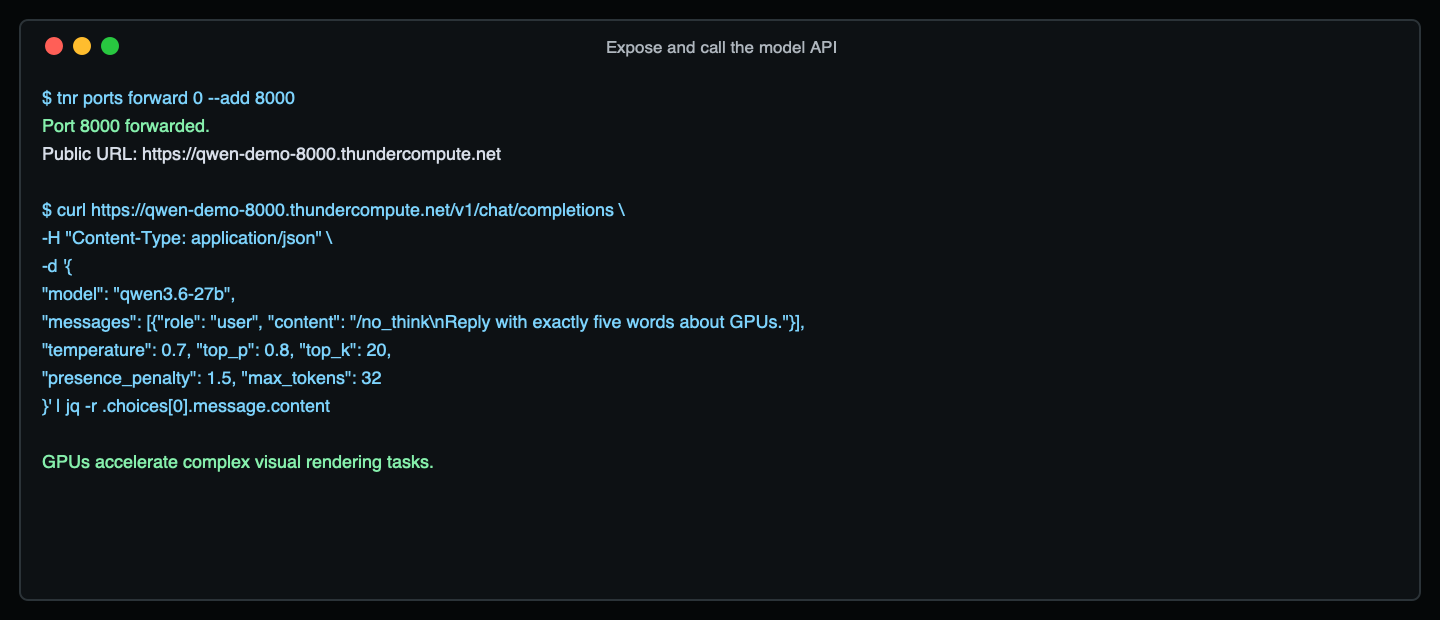
 Expose the endpoint through Thunder Compute port forwarding:
```bash theme={null}
tnr ports forward --add 8000
```
Your public HTTPS endpoint will use this format:
```text theme={null}
https://-8000.thundercompute.net/v1
```
Call the model from your local machine:
```bash theme={null}
curl https://-8000.thundercompute.net/v1/chat/completions \
-H "Content-Type: application/json" \
-d '{
"model": "qwen3.6-27b",
"messages": [
{
"role": "user",
"content": "/no_think\nIn one sentence, explain what a Thunder Compute GPU instance is."
}
],
"temperature": 0.7,
"top_p": 0.8,
"top_k": 20,
"presence_penalty": 1.5,
"max_tokens": 160
}'
```
Expose the endpoint through Thunder Compute port forwarding:
```bash theme={null}
tnr ports forward --add 8000
```
Your public HTTPS endpoint will use this format:
```text theme={null}
https://-8000.thundercompute.net/v1
```
Call the model from your local machine:
```bash theme={null}
curl https://-8000.thundercompute.net/v1/chat/completions \
-H "Content-Type: application/json" \
-d '{
"model": "qwen3.6-27b",
"messages": [
{
"role": "user",
"content": "/no_think\nIn one sentence, explain what a Thunder Compute GPU instance is."
}
],
"temperature": 0.7,
"top_p": 0.8,
"top_k": 20,
"presence_penalty": 1.5,
"max_tokens": 160
}'
```
 You can also point an OpenAI-compatible client at the same URL:
```python theme={null}
from openai import OpenAI
client = OpenAI(
base_url="https://-8000.thundercompute.net/v1",
api_key="EMPTY",
)
response = client.chat.completions.create(
model="qwen3.6-27b",
messages=[
{
"role": "user",
"content": "/no_think\nWrite a short explanation of GPU memory.",
}
],
temperature=0.7,
top_p=0.8,
presence_penalty=1.5,
max_tokens=160,
extra_body={"top_k": 20},
)
print(response.choices[0].message.content)
```
## H100 FP8 Serving With vLLM
Use this path when you want higher-throughput serving on H100 and do not need a GGUF quantization.
H100 is the preferred GPU for this FP8 path. The command below was also verified on a single A100 80 GB instance as an availability fallback.
```bash theme={null}
python3 -m venv .venv
source .venv/bin/activate
pip install -U uv
uv pip install vllm --torch-backend=auto
sudo /sbin/ldconfig
```
Start with the same practical 32K context length, then raise `--max-model-len` after the server is stable:
```bash theme={null}
vllm serve Qwen/Qwen3.6-27B-FP8 \
--host 0.0.0.0 \
--port 8000 \
--served-model-name qwen3.6-27b \
--max-model-len 32768 \
--reasoning-parser qwen3 \
--default-chat-template-kwargs '{"enable_thinking": false}' \
--language-model-only \
--enforce-eager
```
The default chat-template kwargs keep this guide in non-thinking mode. `--enforce-eager` keeps the first smoke test from spending extra startup time on CUDA graph capture. Remove it later when you are tuning throughput.
Forward port `8000` the same way:
```bash theme={null}
tnr ports forward --add 8000
```
Then call:
```bash theme={null}
curl https://-8000.thundercompute.net/v1/chat/completions \
-H "Content-Type: application/json" \
-d '{
"model": "qwen3.6-27b",
"messages": [{"role": "user", "content": "/no_think\nGive me one practical GPU sizing tip."}],
"temperature": 0.7,
"top_p": 0.8,
"max_tokens": 160
}'
```
Qwen's official vLLM example uses a 262,144 token maximum context. That is useful for long-context workloads, but start with 32K for a first smoke test so model loading, routing, and port forwarding are easy to debug.
## Clean Up
Stop the server:
```bash theme={null}
sudo docker rm -f qwen36-llama
```
Exit the instance and delete it when you are done:
```bash theme={null}
exit
tnr delete
```
Billing stops when the instance is deleted.
## References
* [Qwen3.6 27B model card](https://huggingface.co/Qwen/Qwen3.6-27B)
* [Qwen3.6 27B FP8 model card](https://huggingface.co/Qwen/Qwen3.6-27B-FP8)
* [Unsloth Qwen3.6 27B GGUF files](https://huggingface.co/unsloth/Qwen3.6-27B-GGUF)
* [Ollama Qwen3.6 27B](https://ollama.com/library/qwen3.6:27b)
* [Using Docker on Thunder Compute](/guides/using-docker-on-thundercompute)
* [Port Forwarding](/cli/operations/port-forwarding)
You can also point an OpenAI-compatible client at the same URL:
```python theme={null}
from openai import OpenAI
client = OpenAI(
base_url="https://-8000.thundercompute.net/v1",
api_key="EMPTY",
)
response = client.chat.completions.create(
model="qwen3.6-27b",
messages=[
{
"role": "user",
"content": "/no_think\nWrite a short explanation of GPU memory.",
}
],
temperature=0.7,
top_p=0.8,
presence_penalty=1.5,
max_tokens=160,
extra_body={"top_k": 20},
)
print(response.choices[0].message.content)
```
## H100 FP8 Serving With vLLM
Use this path when you want higher-throughput serving on H100 and do not need a GGUF quantization.
H100 is the preferred GPU for this FP8 path. The command below was also verified on a single A100 80 GB instance as an availability fallback.
```bash theme={null}
python3 -m venv .venv
source .venv/bin/activate
pip install -U uv
uv pip install vllm --torch-backend=auto
sudo /sbin/ldconfig
```
Start with the same practical 32K context length, then raise `--max-model-len` after the server is stable:
```bash theme={null}
vllm serve Qwen/Qwen3.6-27B-FP8 \
--host 0.0.0.0 \
--port 8000 \
--served-model-name qwen3.6-27b \
--max-model-len 32768 \
--reasoning-parser qwen3 \
--default-chat-template-kwargs '{"enable_thinking": false}' \
--language-model-only \
--enforce-eager
```
The default chat-template kwargs keep this guide in non-thinking mode. `--enforce-eager` keeps the first smoke test from spending extra startup time on CUDA graph capture. Remove it later when you are tuning throughput.
Forward port `8000` the same way:
```bash theme={null}
tnr ports forward --add 8000
```
Then call:
```bash theme={null}
curl https://-8000.thundercompute.net/v1/chat/completions \
-H "Content-Type: application/json" \
-d '{
"model": "qwen3.6-27b",
"messages": [{"role": "user", "content": "/no_think\nGive me one practical GPU sizing tip."}],
"temperature": 0.7,
"top_p": 0.8,
"max_tokens": 160
}'
```
Qwen's official vLLM example uses a 262,144 token maximum context. That is useful for long-context workloads, but start with 32K for a first smoke test so model loading, routing, and port forwarding are easy to debug.
## Clean Up
Stop the server:
```bash theme={null}
sudo docker rm -f qwen36-llama
```
Exit the instance and delete it when you are done:
```bash theme={null}
exit
tnr delete
```
Billing stops when the instance is deleted.
## References
* [Qwen3.6 27B model card](https://huggingface.co/Qwen/Qwen3.6-27B)
* [Qwen3.6 27B FP8 model card](https://huggingface.co/Qwen/Qwen3.6-27B-FP8)
* [Unsloth Qwen3.6 27B GGUF files](https://huggingface.co/unsloth/Qwen3.6-27B-GGUF)
* [Ollama Qwen3.6 27B](https://ollama.com/library/qwen3.6:27b)
* [Using Docker on Thunder Compute](/guides/using-docker-on-thundercompute)
* [Port Forwarding](/cli/operations/port-forwarding)