> ## Documentation Index
> Fetch the complete documentation index at: https://www.thundercompute.com/docs/llms.txt
> Use this file to discover all available pages before exploring further.
# Thunder Compute Skill for OpenClaw
> Use Thunder Compute from your own OpenClaw instance to see available GPUs, launch and stop instances, create snapshots, and report cost from chat.
Use Thunder Compute from your own OpenClaw instance to discover GPUs, launch GPU instances, run commands, create snapshots, tear instances down, and report cost from chat.
> **Public beta**
> This integration creates real Thunder Compute resources. Start with the smoke test below, confirm teardown, and check cost reporting before using it for longer workloads.
***
## What You Install
The beta integration has two parts:
* **Thunder Compute skill**: teaches the agent how to work with Thunder Compute safely.
* **Thunder Compute plugin bridge**: exposes native OpenClaw `tc_*` tools that call the Thunder Compute MCP server.
The plugin handles execution and OAuth. The skill handles behavior: discovery first when needed, wait for readiness, run the requested command, tear down by default, and report cost.
***
## What You Can Ask For
After setup, you can ask OpenClaw to:
* list live GPU availability
* compare GPU pricing
* list available templates
* spin up an A100 or H100
* run `nvidia-smi` or your own shell command
* create a snapshot when you ask for one
* delete the instance
* report the current invoice impact
Example:
```text theme={null}
Spin up an A100, wait until it is ready, run `nvidia-smi`, then tear it down and tell me the cost.
```
***
## Prerequisites
Before you begin, make sure you have:
* OpenClaw installed and working
* a model provider configured in OpenClaw
* Node.js and npm available
* a Thunder Compute account
* browser access for Thunder Compute OAuth
* the Thunder Compute OpenClaw beta plugin bundle
Thunder Compute's own docs describe the same underlying instance concepts used by this OpenClaw integration: instance mode, GPU type, GPU count, vCPU count, disk size, and template. The OpenClaw plugin exposes those concepts through chat tools instead of the VS Code extension or `tnr` CLI.
Recommended OpenClaw version:
```text theme={null}
OpenClaw 2026.4.15 or newer
```
Minimum plugin API compatibility declared by this beta plugin:
```text theme={null}
OpenClaw plugin API >= 2026.3.24-beta.2
Gateway >= 2026.3.24-beta.2
```
***
## Install The Plugin
Clone the official [Thunder Compute OpenClaw plugin repository](https://github.com/Thunder-Compute/thunder-openclaw-plugin), then enter the plugin directory:
```bash theme={null}
git clone https://github.com/Thunder-Compute/thunder-openclaw-plugin.git
cd thunder-openclaw-plugin
```
The repository contains:
```text theme={null}
openclaw.plugin.json
package.json
package-lock.json
index.ts
README.md
skills/thunder-compute/SKILL.md
```
Do not include local install artifacts or user secrets in the hosted bundle:
```text theme={null}
node_modules/
auth.json
pending-auth.json
.DS_Store
```
Install the package from the directory that contains `openclaw.plugin.json`, `package.json`, and `index.ts`.
```bash theme={null}
npm install
openclaw plugins install .
```
If you are upgrading an earlier beta copy, pull the latest repository copy, uninstall the old plugin, then reinstall:
```bash theme={null}
cd thunder-openclaw-plugin
git pull
npm install
openclaw plugins uninstall thunder-compute
openclaw plugins install .
```
Enable the plugin and point it at the Thunder Compute MCP endpoint:
```bash theme={null}
openclaw config set plugins.entries.thunder-compute.enabled true --strict-json
openclaw config set plugins.entries.thunder-compute.config.endpoint "https://api.thundercompute.com:8443/mcp"
openclaw config set tools.alsoAllow '["thunder-compute"]' --strict-json
openclaw gateway restart
```
> **Important**
> Use `tools.alsoAllow`, not `tools.allow`. `tools.alsoAllow` adds Thunder Compute tools without replacing your existing tool configuration.
***
## Install Or Verify The Skill
The beta plugin bundle includes the Thunder Compute skill under:
```text theme={null}
skills/thunder-compute/SKILL.md
```
If your OpenClaw installation does not automatically load the bundled skill, copy it into your workspace skills folder:
```bash theme={null}
mkdir -p ~/.openclaw/workspace/skills/thunder-compute
cp -R skills/thunder-compute/* ~/.openclaw/workspace/skills/thunder-compute/
```
The installed skill should exist at:
```text theme={null}
~/.openclaw/workspace/skills/thunder-compute/SKILL.md
```
The hosted skill lives inside the same repository at `skills/thunder-compute/SKILL.md`. That gives users one clone that includes both the executable plugin and the behavior instructions.
***
## Verify The Plugin Loaded
Run:
```bash theme={null}
openclaw plugins inspect thunder-compute
```
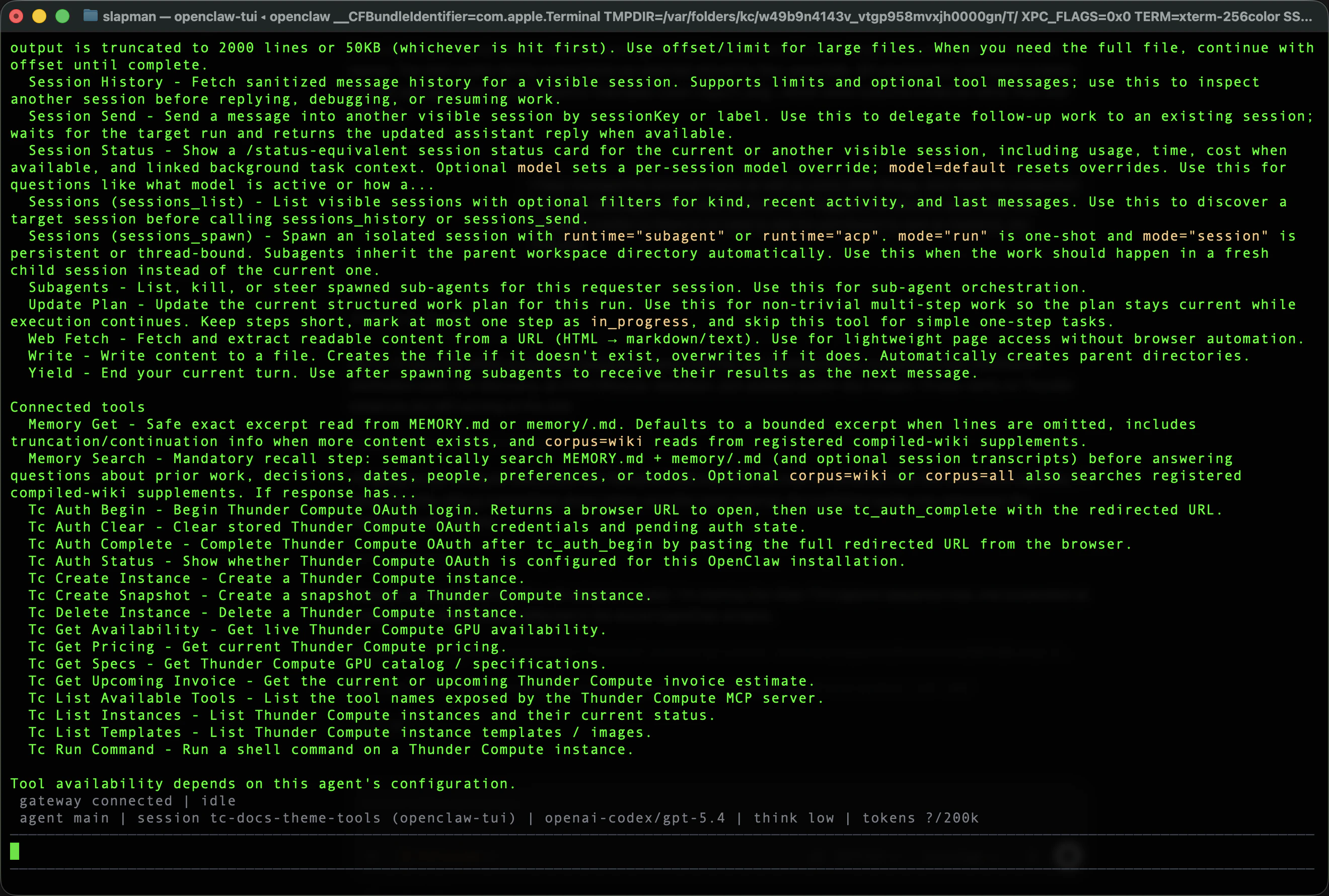
You should see the plugin loaded with Thunder Compute tools such as:
* `tc_auth_status`
* `tc_auth_begin`
* `tc_auth_complete`
* `tc_auth_clear`
* `tc_list_available_tools`
* `tc_get_specs`
* `tc_get_availability`
* `tc_get_pricing`
* `tc_list_templates`
* `tc_list_instances`
* `tc_create_instance`
* `tc_run_command`
* `tc_delete_instance`
* `tc_create_snapshot`
* `tc_get_upcoming_invoice`
Start a new OpenClaw TUI session:
```bash theme={null}
openclaw tui --session thunder-compute-beta --deliver
```
Inside the session, run:
```text theme={null}
/tools verbose
```
You should see the Thunder Compute tools listed.
 ***
## Authenticate With Thunder Compute
Thunder Compute uses browser-based OAuth. You do not need to paste a static API key into the skill.
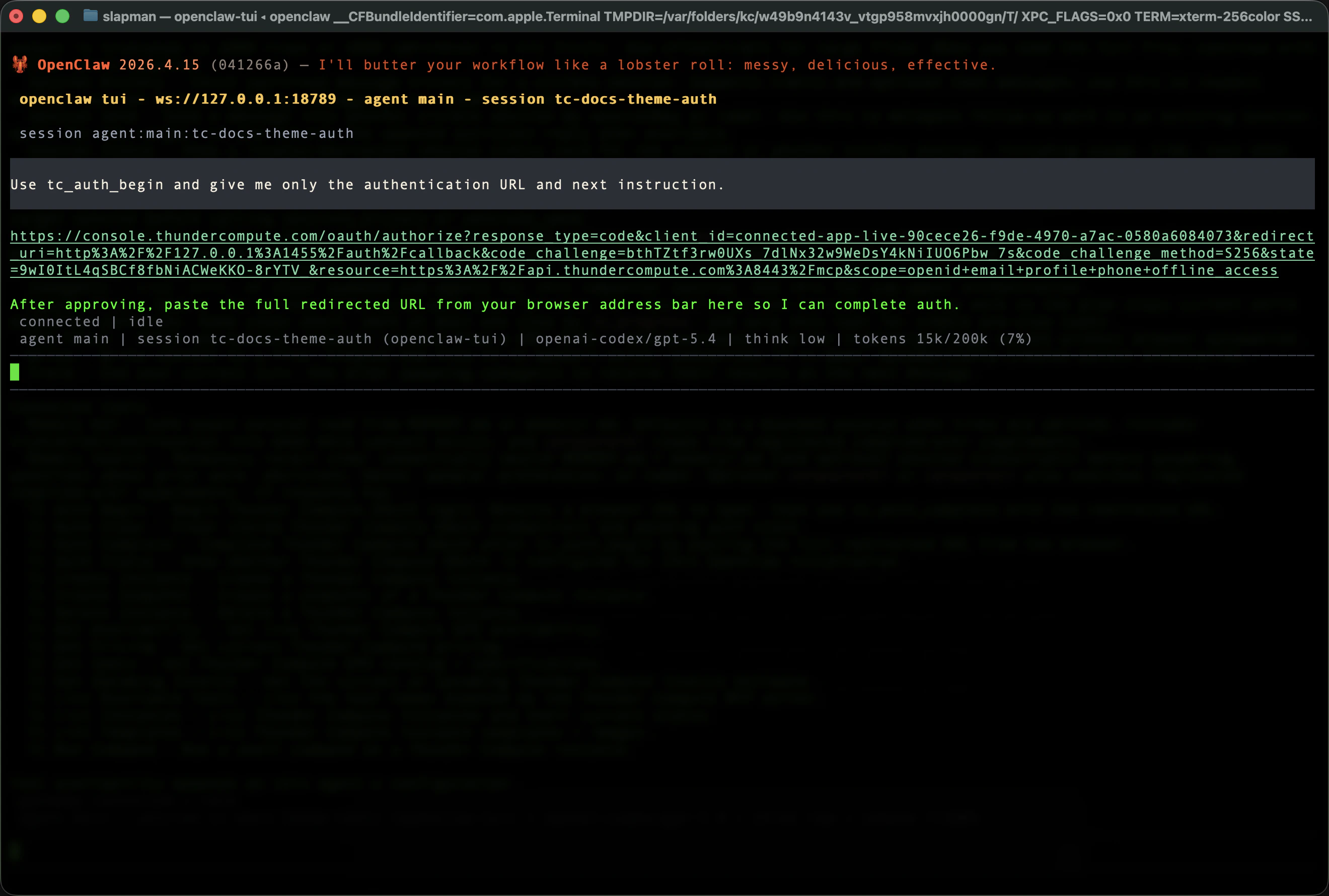
In OpenClaw, ask:
```text theme={null}
Use tc_auth_begin and give me only the authentication URL and next instruction.
```
Open the returned URL in your browser.
***
## Authenticate With Thunder Compute
Thunder Compute uses browser-based OAuth. You do not need to paste a static API key into the skill.
In OpenClaw, ask:
```text theme={null}
Use tc_auth_begin and give me only the authentication URL and next instruction.
```
Open the returned URL in your browser.
 Approve access in the browser.
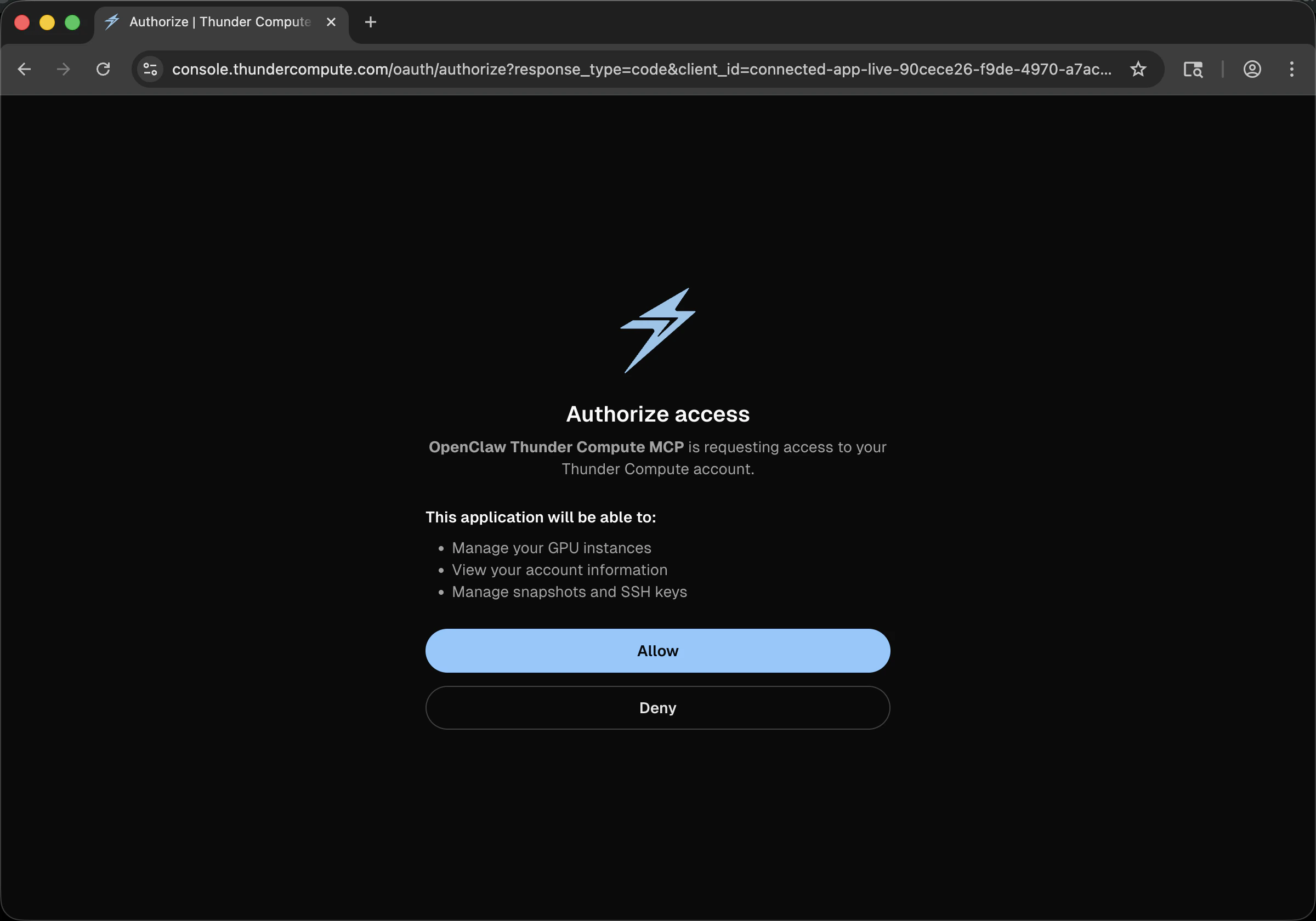 After approval, copy the full redirected callback URL from the browser address bar and send it back to OpenClaw:
```text theme={null}
Use tc_auth_complete with this redirected URL:
```
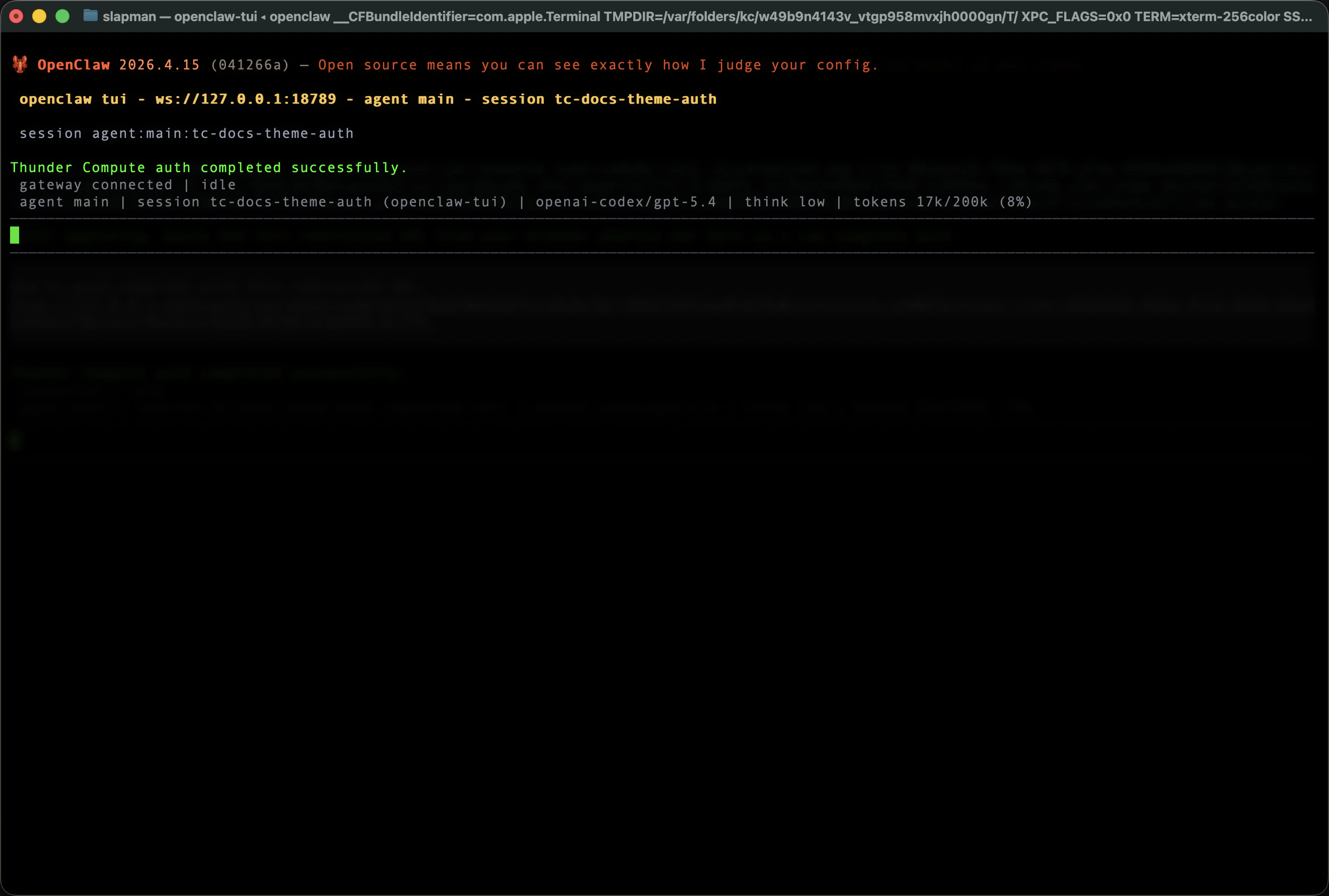
Expected result:
```text theme={null}
Thunder Compute OAuth completed successfully.
```
After approval, copy the full redirected callback URL from the browser address bar and send it back to OpenClaw:
```text theme={null}
Use tc_auth_complete with this redirected URL:
```
Expected result:
```text theme={null}
Thunder Compute OAuth completed successfully.
```
 > The redirected callback URL contains a short-lived authorization code. Treat it as sensitive until authentication is complete.
Thunder Compute access tokens are short-lived. The plugin stores the refresh token from OAuth and refreshes access automatically when possible. To check the current auth state, ask:
```text theme={null}
Use tc_auth_status
```
If refresh fails, rerun `tc_auth_begin` and `tc_auth_complete`.
***
## Verify Live Thunder Compute Connectivity
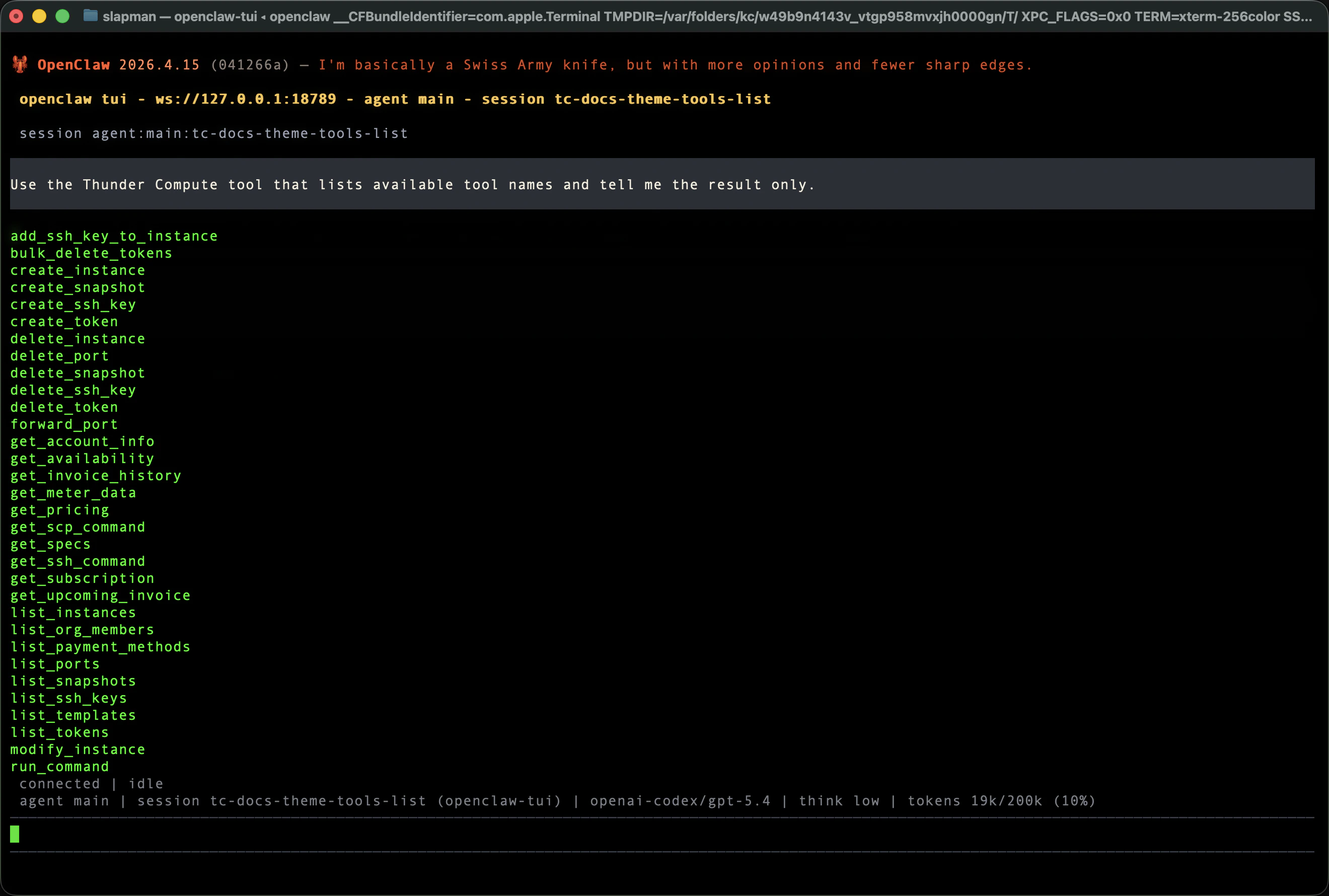
Ask OpenClaw to list the live MCP tool surface:
```text theme={null}
Use the Thunder Compute tool that lists available tool names and tell me the result only.
```
> The redirected callback URL contains a short-lived authorization code. Treat it as sensitive until authentication is complete.
Thunder Compute access tokens are short-lived. The plugin stores the refresh token from OAuth and refreshes access automatically when possible. To check the current auth state, ask:
```text theme={null}
Use tc_auth_status
```
If refresh fails, rerun `tc_auth_begin` and `tc_auth_complete`.
***
## Verify Live Thunder Compute Connectivity
Ask OpenClaw to list the live MCP tool surface:
```text theme={null}
Use the Thunder Compute tool that lists available tool names and tell me the result only.
```
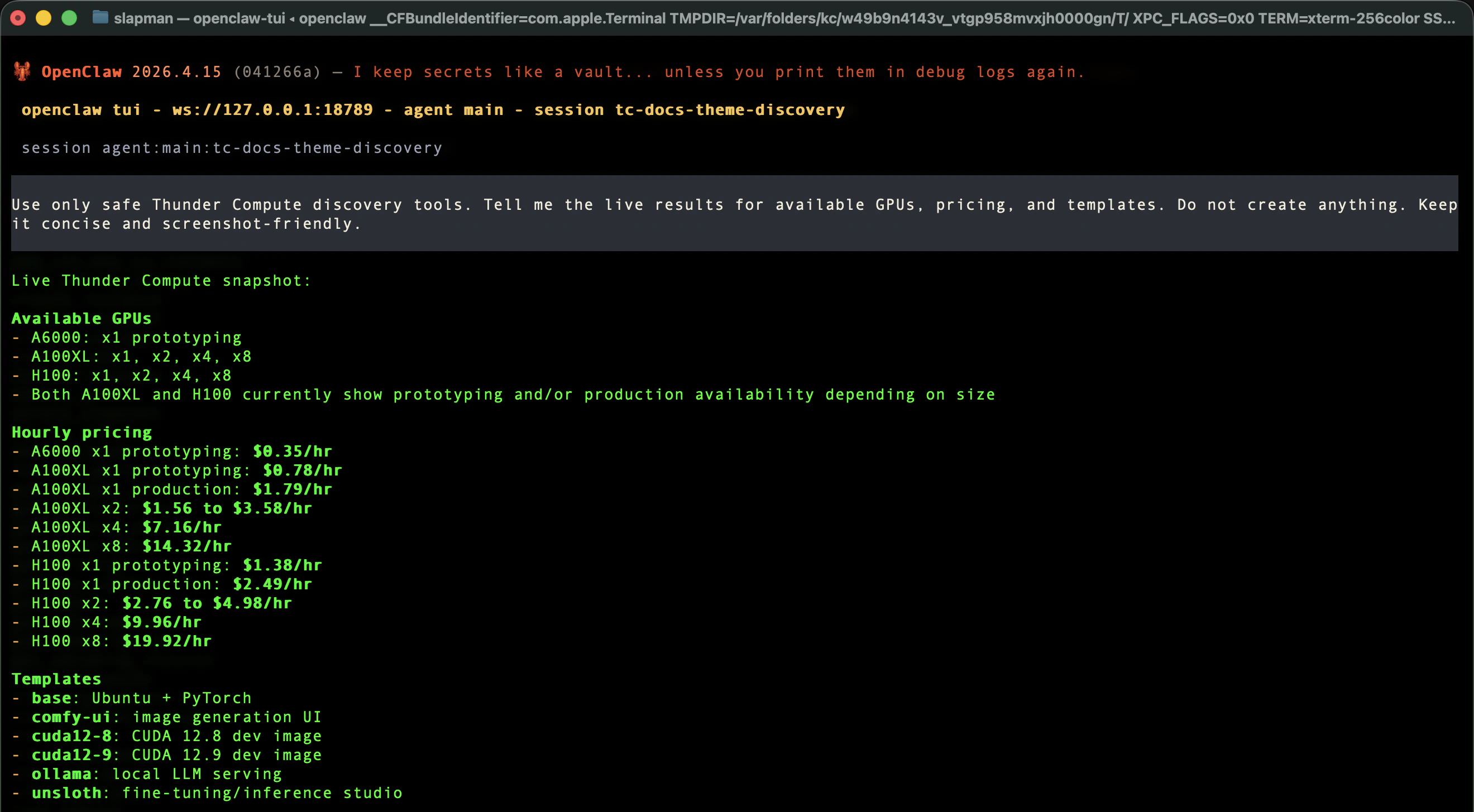
 Then run safe discovery. This does not create an instance:
```text theme={null}
Use only safe Thunder Compute discovery tools. Tell me the live results for available GPUs, pricing, and templates. Do not create anything.
```
Then run safe discovery. This does not create an instance:
```text theme={null}
Use only safe Thunder Compute discovery tools. Tell me the live results for available GPUs, pricing, and templates. Do not create anything.
```
 ***
## Run Your First GPU Smoke Test
Use a short lifecycle test before doing real work:
```text theme={null}
Spin up an A100, wait until it is ready, run `nvidia-smi`, then tear it down and tell me the cost.
```
The agent should:
1. Create a Thunder Compute A100 instance.
2. Wait until it is command-ready.
3. Run `nvidia-smi`.
4. Delete the instance.
5. Report the invoice line or approximate cost.
Successful `nvidia-smi` output should show an NVIDIA GPU, driver version, CUDA version, and exit code `0`.
Thunder Compute instances may take a minute to become ready. This is expected; the agent should wait until the instance is running before retrying the command.
***
## Run Your First GPU Smoke Test
Use a short lifecycle test before doing real work:
```text theme={null}
Spin up an A100, wait until it is ready, run `nvidia-smi`, then tear it down and tell me the cost.
```
The agent should:
1. Create a Thunder Compute A100 instance.
2. Wait until it is command-ready.
3. Run `nvidia-smi`.
4. Delete the instance.
5. Report the invoice line or approximate cost.
Successful `nvidia-smi` output should show an NVIDIA GPU, driver version, CUDA version, and exit code `0`.
Thunder Compute instances may take a minute to become ready. This is expected; the agent should wait until the instance is running before retrying the command.
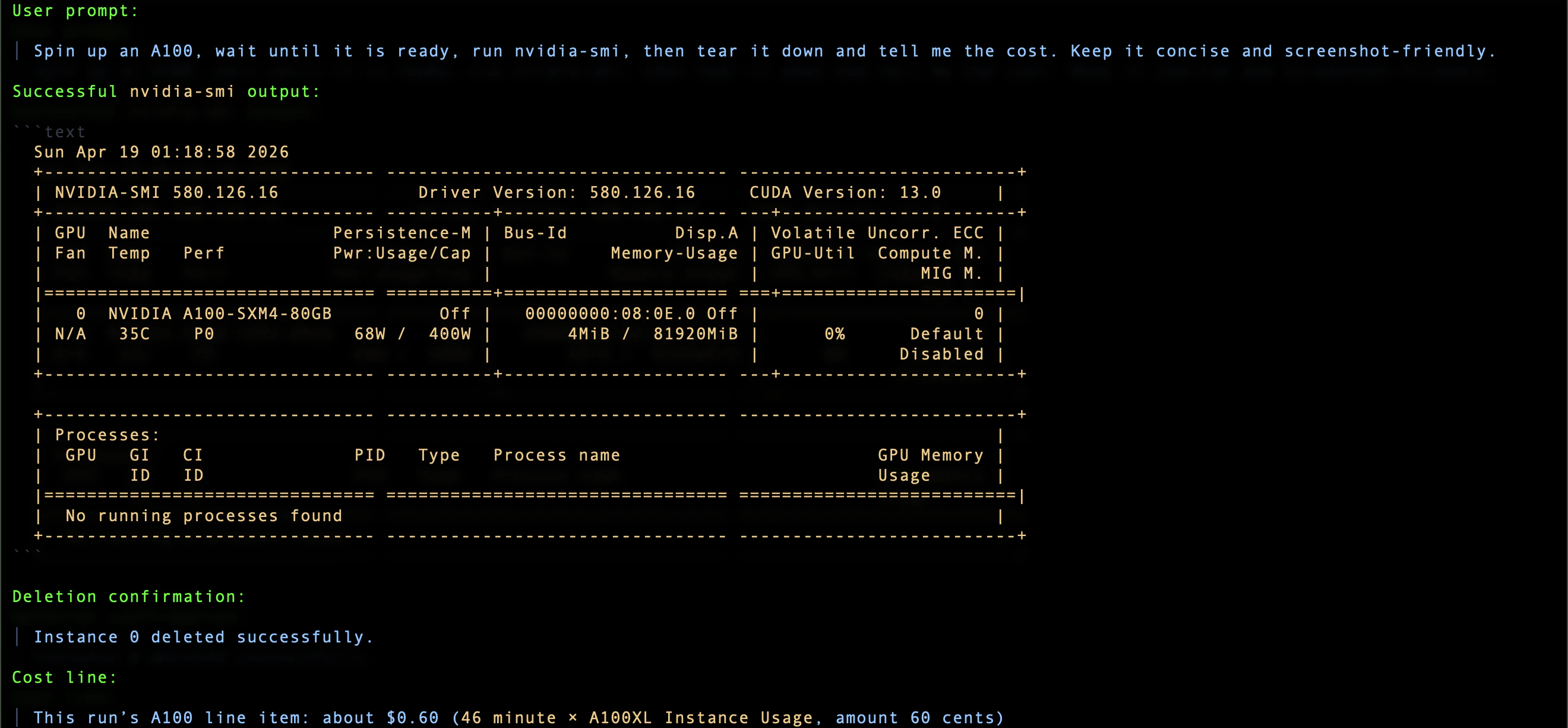 After teardown, confirm the agent reports deletion and cost.
 ***
## Everyday Usage Prompts
Check availability and pricing:
```text theme={null}
What GPU types are available right now, how much do they cost, and what templates can I choose from? Do not create anything yet.
```
Run a short command:
```text theme={null}
Spin up an A100, run `python --version && nvidia-smi`, then tear it down and tell me the cost.
```
Use a template:
```text theme={null}
Spin up an A100 with the CUDA 12.9 template, run `nvcc --version`, then tear it down and tell me the cost.
```
Thunder Compute templates are preconfigured environments for common AI workflows. The current public docs call out `base`, `ollama`, and `comfy-ui` as common templates, and template services may require a start command such as `start-ollama` or `start-comfyui`.
Create a snapshot only when you want to preserve state:
```text theme={null}
Create an A100 instance, run `echo hello`, create a snapshot named hello-test, then delete the instance and tell me the cost.
```
Leave an instance running only when you intentionally want to keep paying for it:
```text theme={null}
Spin up an A100 and leave it running. Tell me the instance ID and current hourly cost.
```
***
## How The Agent Should Behave
The Thunder Compute skill instructs the agent to:
* use live discovery when the request is open-ended
* create the instance the user asked for when the request is specific
* wait through `QUEUED` or `STARTING` until the instance is ready
* run the requested command
* show stdout, stderr, and exit code when relevant
* create snapshots only when asked
* delete instances by default
* report cost in the same response as teardown
If the user explicitly says to leave an instance running, it remains billable until the user or agent deletes it.
***
## Known Beta Caveats
### Skill And Plugin Are Both Required
The skill alone does not create GPU instances. It only teaches behavior. Real Thunder Compute operations happen through the `thunder-compute` plugin tools.
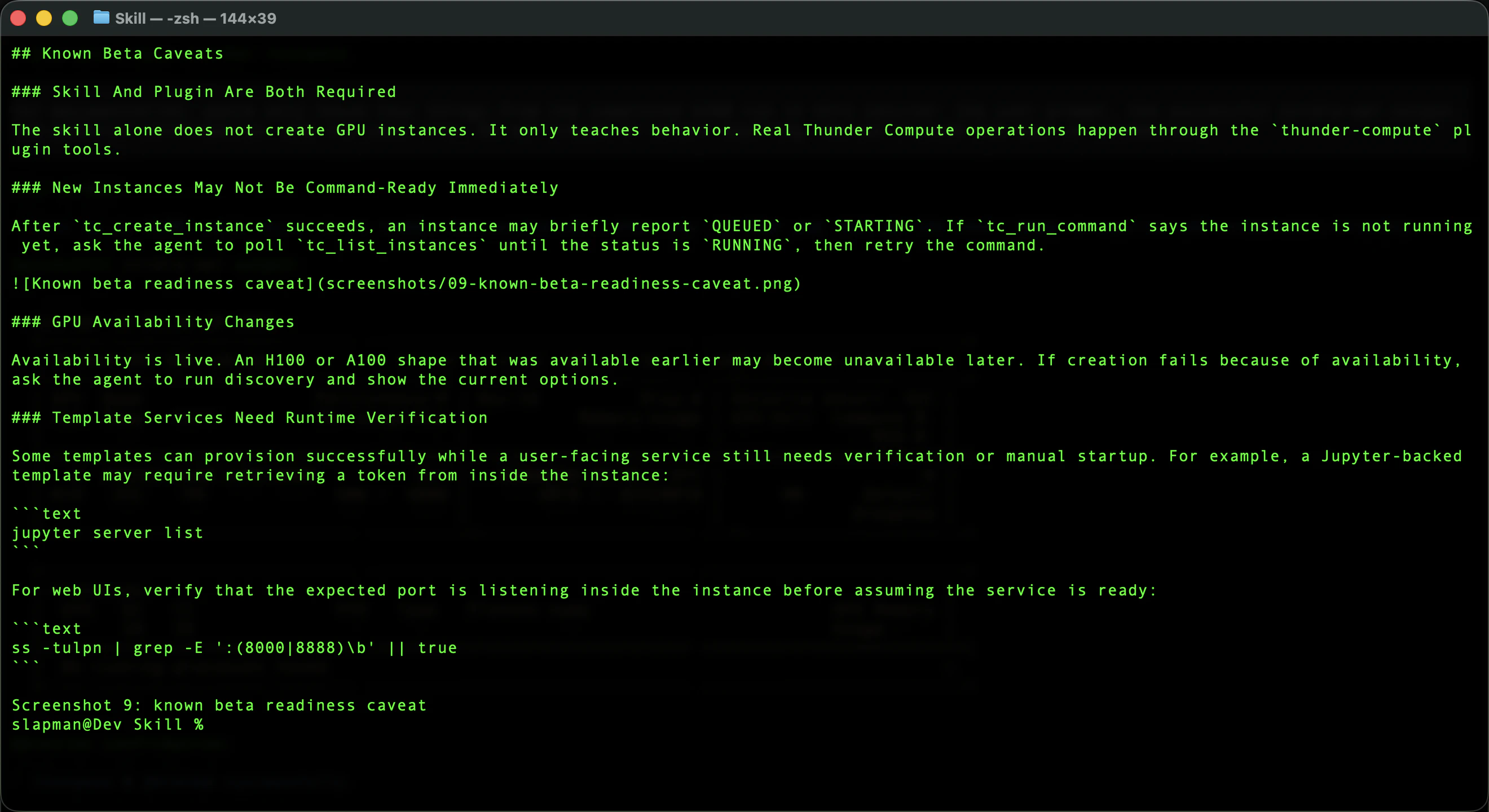
### New Instances May Not Be Command-Ready Immediately
After `tc_create_instance` succeeds, an instance may briefly report `QUEUED` or `STARTING`. If `tc_run_command` says the instance is not running yet, ask the agent to poll `tc_list_instances` until the status is `RUNNING`, then retry the command.
***
## Everyday Usage Prompts
Check availability and pricing:
```text theme={null}
What GPU types are available right now, how much do they cost, and what templates can I choose from? Do not create anything yet.
```
Run a short command:
```text theme={null}
Spin up an A100, run `python --version && nvidia-smi`, then tear it down and tell me the cost.
```
Use a template:
```text theme={null}
Spin up an A100 with the CUDA 12.9 template, run `nvcc --version`, then tear it down and tell me the cost.
```
Thunder Compute templates are preconfigured environments for common AI workflows. The current public docs call out `base`, `ollama`, and `comfy-ui` as common templates, and template services may require a start command such as `start-ollama` or `start-comfyui`.
Create a snapshot only when you want to preserve state:
```text theme={null}
Create an A100 instance, run `echo hello`, create a snapshot named hello-test, then delete the instance and tell me the cost.
```
Leave an instance running only when you intentionally want to keep paying for it:
```text theme={null}
Spin up an A100 and leave it running. Tell me the instance ID and current hourly cost.
```
***
## How The Agent Should Behave
The Thunder Compute skill instructs the agent to:
* use live discovery when the request is open-ended
* create the instance the user asked for when the request is specific
* wait through `QUEUED` or `STARTING` until the instance is ready
* run the requested command
* show stdout, stderr, and exit code when relevant
* create snapshots only when asked
* delete instances by default
* report cost in the same response as teardown
If the user explicitly says to leave an instance running, it remains billable until the user or agent deletes it.
***
## Known Beta Caveats
### Skill And Plugin Are Both Required
The skill alone does not create GPU instances. It only teaches behavior. Real Thunder Compute operations happen through the `thunder-compute` plugin tools.
### New Instances May Not Be Command-Ready Immediately
After `tc_create_instance` succeeds, an instance may briefly report `QUEUED` or `STARTING`. If `tc_run_command` says the instance is not running yet, ask the agent to poll `tc_list_instances` until the status is `RUNNING`, then retry the command.
 ### GPU Availability Changes
Availability is live. An H100 or A100 shape that was available earlier may become unavailable later. If creation fails because of availability, ask the agent to run discovery and show the current options.
### Template Services Need Runtime Verification
Some templates can provision successfully while a user-facing service still needs verification or manual startup. For example, a Jupyter-backed template may require retrieving a token from inside the instance:
```text theme={null}
jupyter server list
```
For web UIs, verify that the expected port is listening inside the instance before assuming the service is ready:
```text theme={null}
ss -tulpn | grep -E ':(8000|8888)\b' || true
```
***
## Related Thunder Compute Docs
These Thunder Compute docs explain the underlying concepts used by this OpenClaw beta:
* [Creating Instances](https://www.thundercompute.com/docs/vscode/operations/creating-instances)
* [Instance Templates](https://www.thundercompute.com/docs/guides/using-instance-templates)
* [Technical Specifications](https://www.thundercompute.com/docs/technical-specs)
* [GPT-OSS 120B on Thunder Compute](https://www.thundercompute.com/docs/guides/gpt-oss-running-locally-on-thunder-compute)
* [Docs MCP Server](https://www.thundercompute.com/docs/guides/mcp-server#mcp-server)
The docs MCP server page is for hosting Thunder Compute documentation locally for AI tools. Users do not need to install that docs MCP server to use this OpenClaw beta; the OpenClaw plugin connects to the Thunder Compute MCP endpoint internally.
***
## Troubleshooting
### Thunder Compute tools do not appear
Check:
* the plugin is installed with `openclaw plugins inspect thunder-compute`
* the plugin is enabled
* `tools.alsoAllow` includes `"thunder-compute"`
* the gateway was restarted after configuration
Useful commands:
```bash theme={null}
openclaw plugins inspect thunder-compute
openclaw config get plugins.entries.thunder-compute.enabled
openclaw config get tools.alsoAllow
openclaw gateway restart
```
### Authentication Fails Or Expires
First check auth status:
```text theme={null}
Use tc_auth_status
```
Access tokens are short-lived and should refresh automatically when a refresh token is available. If auth is missing or refresh fails, restart the OAuth flow:
```text theme={null}
Use tc_auth_begin and give me only the authentication URL and next instruction.
```
Then approve in the browser and pass the redirected callback URL to:
```text theme={null}
Use tc_auth_complete with this redirected URL:
```
To reset stored Thunder Compute OAuth state:
```text theme={null}
Use tc_auth_clear
```
Then authenticate again.
### Instance creation fails
Ask for live options:
```text theme={null}
Use only safe Thunder Compute discovery tools. Tell me the live availability, pricing, and templates. Do not create anything.
```
Then retry with a currently available GPU and valid template.
### The command says the instance is still starting
Ask:
```text theme={null}
Poll tc_list_instances until the instance is RUNNING, then retry the command.
```
### You are unsure whether anything is still billing
Ask:
```text theme={null}
List my Thunder Compute instances and tell me whether anything is still running or billing.
```
If anything should be stopped:
```text theme={null}
Delete the Thunder Compute instance you created and report the result and cost.
```
***
## Summary
Thunder Compute for OpenClaw beta gives your agent a real GPU lifecycle:
* discover live GPU options
* authenticate with Thunder Compute
* create a GPU instance
* run commands
* tear down by default
* report cost
Use the A100 smoke test first. Once that works, use the same pattern for real workloads.
### GPU Availability Changes
Availability is live. An H100 or A100 shape that was available earlier may become unavailable later. If creation fails because of availability, ask the agent to run discovery and show the current options.
### Template Services Need Runtime Verification
Some templates can provision successfully while a user-facing service still needs verification or manual startup. For example, a Jupyter-backed template may require retrieving a token from inside the instance:
```text theme={null}
jupyter server list
```
For web UIs, verify that the expected port is listening inside the instance before assuming the service is ready:
```text theme={null}
ss -tulpn | grep -E ':(8000|8888)\b' || true
```
***
## Related Thunder Compute Docs
These Thunder Compute docs explain the underlying concepts used by this OpenClaw beta:
* [Creating Instances](https://www.thundercompute.com/docs/vscode/operations/creating-instances)
* [Instance Templates](https://www.thundercompute.com/docs/guides/using-instance-templates)
* [Technical Specifications](https://www.thundercompute.com/docs/technical-specs)
* [GPT-OSS 120B on Thunder Compute](https://www.thundercompute.com/docs/guides/gpt-oss-running-locally-on-thunder-compute)
* [Docs MCP Server](https://www.thundercompute.com/docs/guides/mcp-server#mcp-server)
The docs MCP server page is for hosting Thunder Compute documentation locally for AI tools. Users do not need to install that docs MCP server to use this OpenClaw beta; the OpenClaw plugin connects to the Thunder Compute MCP endpoint internally.
***
## Troubleshooting
### Thunder Compute tools do not appear
Check:
* the plugin is installed with `openclaw plugins inspect thunder-compute`
* the plugin is enabled
* `tools.alsoAllow` includes `"thunder-compute"`
* the gateway was restarted after configuration
Useful commands:
```bash theme={null}
openclaw plugins inspect thunder-compute
openclaw config get plugins.entries.thunder-compute.enabled
openclaw config get tools.alsoAllow
openclaw gateway restart
```
### Authentication Fails Or Expires
First check auth status:
```text theme={null}
Use tc_auth_status
```
Access tokens are short-lived and should refresh automatically when a refresh token is available. If auth is missing or refresh fails, restart the OAuth flow:
```text theme={null}
Use tc_auth_begin and give me only the authentication URL and next instruction.
```
Then approve in the browser and pass the redirected callback URL to:
```text theme={null}
Use tc_auth_complete with this redirected URL:
```
To reset stored Thunder Compute OAuth state:
```text theme={null}
Use tc_auth_clear
```
Then authenticate again.
### Instance creation fails
Ask for live options:
```text theme={null}
Use only safe Thunder Compute discovery tools. Tell me the live availability, pricing, and templates. Do not create anything.
```
Then retry with a currently available GPU and valid template.
### The command says the instance is still starting
Ask:
```text theme={null}
Poll tc_list_instances until the instance is RUNNING, then retry the command.
```
### You are unsure whether anything is still billing
Ask:
```text theme={null}
List my Thunder Compute instances and tell me whether anything is still running or billing.
```
If anything should be stopped:
```text theme={null}
Delete the Thunder Compute instance you created and report the result and cost.
```
***
## Summary
Thunder Compute for OpenClaw beta gives your agent a real GPU lifecycle:
* discover live GPU options
* authenticate with Thunder Compute
* create a GPU instance
* run commands
* tear down by default
* report cost
Use the A100 smoke test first. Once that works, use the same pattern for real workloads.