Kimi K2 is an open-weight Large Language Model (LLM) family developed by Moonshot AI, a Beijing-based AI lab. Its base model launched in July 2025 and quickly ranked first among open-source models on the LMSYS Arena leaderboard. The model is optimized for agentic tasks: tool use, multi-step planning, and autonomous code execution.
The easiest way to run Kimi K2 with Ollama is by using the :cloud tag to offload inference to Ollama Cloud, which has a pretty generous free tier. For private self-hosted deployments, this guide covers that path on a Thunder Compute GPU cluster.
Kimi K2 Model Versions
Since the original July 2025 release, Moonshot AI has shipped multiple iterations of the K2 series:
| Version | Release Date | Ollama Tag | Key Addition |
|---|---|---|---|
| Kimi K2 Base | July 10, 2025 | Retired June 16, 2026 | Original open-weight release, 128K context |
| Kimi K2 Instruct | September 5, 2025 | Retired June 16, 2026 | Improved agentic coding, 256K context |
| Kimi K2 Thinking | November 6, 2025 | Retired June 16, 2026 | Extended chain-of-thought reasoning mode |
| Kimi K2.5 | January 27, 2026 | Retired July 31, 2026 | Native multimodal (vision + text), Agent Swarm |
| Kimi K2.6 | April 20, 2026 | kimi-k2.6:cloud |
300-agent swarm, production-grade coding, multimodal |
| Kimi K2.7 Code | June 12, 2026 | kimi-k2.7-code:cloud |
Coding-focused, ~30% fewer thinking tokens vs K2.6 |
Released July 16, 2026, Kimi K3 is a 2.8T-parameter MoE (16 of 896 experts active per token) with a 1M-token context window and native multimodal input, it beats the K2 line across most coding and agentic benchmarks.
For most workloads, kimi-k2.6:cloud is the right tag for general chat, multimodal input, and agent orchestration. For agentic coding specifically, kimi-k2.7-code:cloud cuts thinking-token usage by roughly 30% with the same 1T-parameter architecture.
Understanding the Kimi K2 Model
Kimi K2 uses a Mixture-of-Experts (MoE) architecture, letting it scale to massive parameter counts without proportionally increasing inference cost. A routing mechanism selects a small subset of specialized "expert" networks for each input rather than activating every parameter. This is how K2 carries 1T total parameters while computing through only 32B per forward pass.
The model was trained on 15.5T tokens using the MuonClip optimizer, a method Moonshot AI developed to stabilize large-scale MoE training.
Kimi K2 Context Window Size
In July 2025, the original K2 Base shipped with a 128K context window. The Instruct version extended this to 256K tokens which holds for all subsequent models.
For self-hosted inference with llama.cpp or Ollama, context window size directly affects VRAM requirements. This means it's best to configure it conservatively unless you have ample memory headroom.
Kimi K2 vs GPT and Claude
The benchmarks below are from the official technical report and third-party evaluations, all under non-thinking (standard inference) settings.
| Benchmark | Kimi K2.6 | GPT-5.5 | Claude Opus 4.7 |
|---|---|---|---|
| SWE-Bench Verified | 80.2% | 88.7%1 | 87.6% |
| SWE-Bench Pro | 58.6% | 58.6%2 | 64.3% |
| LiveCodeBench v6 | 86.8% | 85.2% | 85.0% |
| BrowseComp | 83.2% / 86.3%3 | 84.4% | 79.3% |
| HLE with tools | 54.0% | 41.4% | 54.7% |
For a broader comparison of leading open-source models, see our guide to the best open-source LLMs.
How Good Is Kimi K2?
Kimi K2 Strengths
Kimi K2 was genuinely strong in the areas it was designed for, though its lead has since narrowed. At launch, SWE-Bench results showed it consistently outperforming GPT-4.1 and DeepSeek-V3 on software engineering tasks, and it led the open-source field on LiveCodeBench by a meaningful margin.
That lead didn't hold. DeepSeek V4, GLM 5.3, and Moonshot's own Kimi K3 have since overtaken K2 on the coding benchmarks it was once known for.
In September 2026, K2.6 and K2.7 remain cost effective alternatives to K3. But competing open source models have aggressive pricing models that offer more for less money. This is the case for DeepSeek V4 which offers off-peak API pricing that's close in cost to these models.
Kimi K2 Weaknesses
The base K2 model is text-only; vision capabilities were added in K2.5 (January 2026). Inference speed on quantized local builds is a real constraint: the 1.8-bit quant maxes out at a few tokens per second without enterprise multi-GPU hardware.
Kimi K2 Use Cases
K2 is best suited for:
- Developers who need a high-quality open-weight coding and agentic model
- Teams that want to self-host for data privacy reasons
- Workflows that can route inference through cloud GPUs like Thunder Compute when local hardware falls short
How to Run Kimi K2 with Ollama in Cloud Mode
Ollama's :cloud tags send prompts to Moonshot's infrastructure through Ollama's servers, streaming responses back to your terminal exactly like a local model. Only a small manifest file (a few KB) is stored on your machine.
Step 1: Install Ollama
Download and install Ollama from ollama.com for macOS, Windows, or Linux. On macOS, brew install ollama also works.
Step 2: Sign In
Cloud models require an Ollama account. Sign in from the terminal:
ollama signin
This opens a browser prompt. Complete the approval and return to the terminal. Signing in does not require payment information. Basic usage of cloud models is free within Ollama's usage limits.
Step 3: Run Kimi K2.6
ollama run kimi-k2.6:cloud
The first response can take 10–30 seconds while Ollama establishes the cloud session. After that, responses stream at normal speed. ollama list will show kimi-k2.6:cloud at only a few KB. This is expected, since inference runs on Moonshot's servers.
For agentic coding specifically, kimi-k2.7-code:cloud offers roughly 30% fewer thinking tokens per task:
ollama run kimi-k2.7-code:cloud
Step 4: Use K2.6 with Coding Agents
Ollama supports launching popular coding agents with Kimi K2.6 as the backend:
# Claude Code
ollama launch claude --model kimi-k2.6:cloud

# OpenCode
ollama launch opencode --model kimi-k2.6:cloud

# Codex App
ollama launch codex-app --model kimi-k2.6:cloud
Why Self-Hosting Kimi K2 Requires a Cloud GPU
For private inference with regulated data, very high sustained throughput, or custom fine-tuned weights, you'll need to self-host the model weights. But, in order to achieve this, you'll need to match substantial hardware requirements.
The Hardware Requirements at 1T Parameters
K2's MoE architecture keeps inference memory requirements lower than a dense 1T model, but they're still significant. Model weights in FP8 format take up about 1TB on disk. Even the highly quantized 1.8-bit GGUF comes in around 250GB.
A Q4 quantization runs to approximately 584GB, requiring at least 600GB of combined RAM and VRAM, meaning multi-GPU server configurations like 8x H100 or H200 nodes. A 24GB consumer GPU like an RTX 4090 can handle the 1.8-bit variant by offloading MoE layers to system RAM, but inference speed drops to roughly 1–2 tokens per second, too slow for practical use.
For a full breakdown of which cloud GPU fits your workload and budget, see the Thunder Compute guide to the best GPU for LLM work.
Why Thunder Compute Is a Viable Option
Thunder Compute is a Y Combinator-backed cloud GPU provider offering on-demand access to A100s and H100s at a fraction of the cost of owning hardware. It ships a pre-configured Ollama template, removing the biggest friction point when working with large models in the cloud.
Self-Hosting Kimi K2.6 or K2.7 Code
| Precision | Approx. Weight Size | Total VRAM1 | Minimum Config |
|---|---|---|---|
| UD-Q2_K_XL (community GGUF) | ~325–350 GB | ~400 GB | 8x A100 80GB ($11.92/hr) |
| UD-Q4_K_XL (community GGUF) | ~595–605 GB | ~640 GB | 8x A100 80GB ($11.92/hr) |
| Native INT4 (official checkpoint) | ~605–615 GB | ~650 GB | 8x A100 80GB ($11.92/hr) |
Given that Q2 and Q4/INT4 configurations land at similar hourly costs, the case for choosing Q2 over the near-lossless Q4/Q8 build isn't really about saving money, but about concurrency. Q2's smaller footprint leaves more VRAM headroom on the same GPU count, which matters if you're serving multiple simultaneous requests and need room for several users' KV caches at once.
How to Self Host Kimi K2 with Ollama on Thunder Compute
The steps below walk through the complete setup from account creation to a live Ollama API endpoint serving Kimi K2. The process takes around 10–15 minutes depending on model download speed.
Step 1: Install the Thunder Compute CLI
Download and install tnr for Windows, or macOS.
Run this command for Linux:
curl -fsSL https://raw.githubusercontent.com/Thunder-Compute/thunder-cli/main/scripts/install.sh | bash
Step 2: Login
tnr login
Step 3: Launch and connect to an Ollama instance
tnr create --template ollama
Pick the hardware configuration for your instance. Refer to the table above for recommended specs.
Step 4: Connect to Your Instance and Start Ollama
Establish a connection once the instance is created.
tnr connect 0
Start the Ollama UI. This will take around a minute. Click the link provided by the terminal to open Ollama in a browser. You'll be prompted to create an account.
start-ollama
Step 5: Load the desired model
- In the Ollama UI, click "Select a model".
- Add the URL of the model from the Ollama page.
- Click "Pull [MODEL_URL]" in the dropdown.
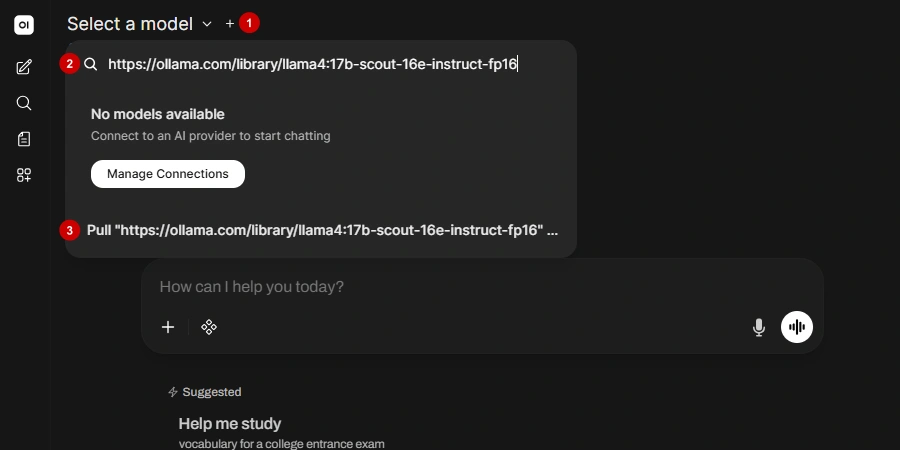
Your download will start. A few good variants ordered from lightest to heaviest:
- https://huggingface.co/unsloth/Kimi-K2-Instruct-GGUF
- https://huggingface.co/moonshotai/Kimi-K2-Instruct
Note on Ollama compatibility: If you are running a self-compiled Ollama older than 0.9.x, you may need to raise
LLAMA_MAX_EXPERTSfrom 256 to 384 inllama-hparams.hbefore recompiling, because Kimi K2 uses 384 experts. Current Ollama releases handle this automatically.
Step 6: Start chatting
Once the model downloads, you can start interacting with it. The first response will take longer because the GPU is loading the model into memory.
Kimi K2 Pricing: API Costs and Cloud vs. Self-Hosted
Understanding the cost landscape helps you decide between the Kimi K2 API, a third-party inference provider, or a self-hosted setup on cloud GPUs like Thunder Compute.
API Pricing by Provider
| Provider | Model | Input (Cache hit)1 | Input1 | Output1 |
|---|---|---|---|---|
| OpenRouter | Kimi K2 (0711) | N/A | $0.57 | $2.30 |
| OpenRouter | Kimi K2 (0905) | N/A | $0.60 | $2.50 |
| Moonshot AI | Kimi K2.6 | $0.16 | $0.95 | $4.00 |
| Moonshot AI | Kimi K2.7 Code | $0.19 | $0.95 | $4.00 |
| Moonshot AI | Kimi K2.7 Code (Highspeed) | $0.38 | $1.90 | $8.00 |
| 1Cost per million tokens. | ||||
When Does Self-Hosting on Thunder Compute Make Sense?
For most users, the API or the Ollama cloud tag is the better default: managed providers are cheaper per token, faster to start, and require no infrastructure work. Self-hosting makes sense for three specific scenarios:
- Data sovereignty: Regulated data (healthcare, legal, finance) that cannot leave your infrastructure requires a self-hosted deployment.
- Very high sustained throughput: At tens of millions of tokens per day with consistently high GPU utilization, the fixed hourly rate can undercut per-token pricing.
- Fine-tuning and custom weights: Modifying the model, merging adapters, or running a custom checkpoint requires direct access to the weights.
Last Thoughts on Kimi K2
Kimi K2 remains one of the strongest open-weight models you can practically self-host with Ollama. K3's 2.8T-parameter scale puts it beyond single-box Ollama setups, so the K2 line is still a reliable option for local and small-cluster deployments.
For most developers, ollama run kimi-k2.6:cloud is the fastest path to a working setup. But, for teams with private data or high-throughput requirements, Thunder Compute's multi-GPU A100 and H100 instances with pre-installed Ollama get you to a self-hosted deployment in under 15 minutes.
FAQ
What Is Kimi K2?
Kimi K2 is an open-weight LLM released by Moonshot AI in July 2025. It uses a Mixture-of-Experts architecture with 1T total parameters and 32B active parameters per forward pass, optimized for agentic tasks, coding, and long-context reasoning.
How Do I Run Kimi K2 with Ollama?
Run ollama signin, then kimi-k2.6:cloud. No GPU or download required; inference runs on Moonshot's servers. For a private self-hosted deployment, use Thunder Compute's Ollama template with a multi-GPU A100 or H100 instance.
What is the `:cloud` in Ollama?
A cloud passthrough tag that forwards prompts to Moonshot's infrastructure via Ollama's servers. Only a small manifest (a few KB) is stored locally.
How Do I Use Kimi K2?
Three options: the Kimi chat interface at kimi.com, API access via Moonshot AI, or self-hosted inference on a Thunder Compute GPU with Ollama.
How Good Is Kimi K2?
Strong for coding and agentic tasks. K2 Instruct scores 65.8% on SWE-Bench Verified; K2.6 pushes this to 80.2% and leads open-source on LiveCodeBench v6 at 89.6%. Dedicated reasoning models score higher on math olympiad problems.
Who Made Kimi K2?
Moonshot AI, a Chinese AI company founded in 2023 and headquartered in Beijing. Backed by Alibaba, its valuation rose from $4.8B in January 2026 to $20B by May 2026 following a $2B Series D.
How Much VRAM Does Kimi K2 Need to Self-Host?
At least 247GB combined RAM and VRAM for the 1.8-bit quantization, or around 600GB for Q4 quality. An 8x A100 80GB cluster (640GB VRAM) covers native INT4 weights (~594GB) with headroom for KV cache.
When should I self-host Kimi K2 instead of using the API?
Self-hosting makes sense for regulated data that cannot leave your infrastructure, very high sustained throughput where hourly GPU rates undercut per-token pricing, or when you need to fine-tune or run custom model weights.