LTX-2.3 is one of the strongest open-source video generation models today, and it stands out for its ability to generate audio simultaneously.
This guide covers what changed in LTX-2.3, how to install it and use all six native ComfyUI workflows, and when the LTX API makes more sense than a local setup.

What Is LTX-2.3?
LTX-2.3 is an open-weights video engine developed by Lightricks and released on March 5, 2026. It generates synchronized video and audio in a single forward pass, reaching 4K resolution at 50 FPS and 20 seconds of footage. The weights are available on Hugging Face under the LTX-2 License (Free for non-commercial and organizations under $10M revenue; commercial license required above that threshold).
NoteNote: Lightricks released LTX-2.5 on August 11, 2026. This newer open-weights model adds native multi-shot scenes, automatic clip duration, native 4K HDR and RAW output, a Gemma 4 12B text encoder, and a faster distilled model.
What Changed from LTX-2
LTX-2.3 added much-needed (and requested) improvements:
- Sharper textures and cleaner edges.
- Reduced texture drift.
- Increased prompt adherence.
- Audio with reduced noise and cleaner dialogue.
- Native portrait (9:16) vertical video.
LTX-2.3 Model Variants
The model ships in several checkpoint variants for different hardware. Official system requirements list 32GB VRAM as the minimum for the full BF16 dev model. Community FP8 builds extend support to 16GB cards when paired with the FP4-mixed Gemma encoder.
| Variant | Parameters | Precision | Steps | Min VRAM |
|---|---|---|---|---|
| 22B Dev | 22B | BF16 | 20–50 | 32GB+¹ |
| 22B Dev FP8 | 22B | FP8 | 20–50 | 16GB |
| 22B Distilled | 22B | BF16 | 4–8 | 32GB+¹ |
| 22B Distilled FP8 | 22B | FP8 | 4–8 | 16GB |
| NVFP4² | 22B | NVFP4 | 4–8 | 24GB² |
¹ Per official Lightricks system requirements. ² NVFP4 requires RTX 50xx (Blackwell) GPUs.
The RTX 4090 (24GB) can cover the FP8 dev model at 720p when paired with the FP4 Gemma encoder. Comfortable 1080p output from the dev model requires 40GB+, which puts it beyond consumer GPUs. The official LTX API or a cloud GPU instance are practical options without quantization trade-offs.
What LTX-2.3 Can Generate
LTX-2.3 Text-to-Video (T2V)
Text-to-video is the most direct mode. Write a prompt, set resolution and frame count, and the model generates a video from scratch. LTX-2.3's improved text connector means it follows detailed prompts more reliably, including camera direction terms and composite scene descriptions.
LTX-2.3 Image-to-Video (I2V)
Image-to-video takes a static image as the first frame and animates it forward based on a motion prompt. The motion consistency improvements in LTX-2.3 are most visible here: earlier versions produced frozen frames or jitter artifacts, and 2.3 substantially reduces both.
LTX-2.3 First-Last Frame Interpolation (FLF2V)
FLF2V generates the motion between established opening and closing frames. It works well for controlled transformations and transitions. Complex multi-step actions with very different keyframes tend to produce more conservative interpolations.
LTX-2.3 Image-Audio-to-Video (IA2V)
IA2V generates a lip-synced video from a reference image and an audio file. It handles real people, digital humans, and illustrated characters in portrait and half-body formats.
LTX-2.3 IC-LoRA Union Control
IC-LoRA transfers motion structure from a reference to generate new content. It supports depth maps, Canny edge detection, and human pose estimation.
LTX-2.3 ID-LoRA Personalized Video
ID-LoRA adapts the model to a specific person's appearance and voice using a reference image and short audio clip. It generates personalized speaking videos with synchronized audio in a single pass.
LTX-2.3 VRAM Requirements
VRAM by Checkpoint and Resolution
LTX-2.3 VRAM requirements grow significantly with increased resolution. The figures below are community-reported estimates; actual usage varies by frame count and whether the Gemma encoder is offloaded via the API node.
| VRAM tier | Example GPUs | Workload |
|---|---|---|
| 16GB | RTX 5080, RTX 4080 SUPER | Preview and prompt iteration on the distilled checkpoint with FP8. Draft resolution, short clips (33–49 frames). |
| 24–32GB | RTX 4090 (24GB), RTX 5090 (32GB) | Production two-stage generation at 720p–1080p. 32GB adds headroom for concurrent IC-LoRA. |
| 48GB | L40S, RTX 6000 Ada | LoRA fine-tuning at practical batch sizes. Inference no longer needs FP8 to fit. |
| 80GB+ | A100 80GB, H100 | Full model training and audio-video LoRA at full sequence length. |
Tiers from Lightricks' hardware guide, calibrated for LTX-2.3 with FP8 quantization enabled.
What Does LTX-2.3 Cost to Run?
The model weights are free to download from Hugging Face under the Apache 2.0 license. There are two main ways to run LTX-2.3: the LTX API (Lightricks' hosted service) or self-hosting on a GPU.
| Option | Cost | Setup | Best for |
|---|---|---|---|
| LTX API Fast | $0.06/sec1 | API key configuration | Low volume, no GPU available |
| LTX API Pro | $0.08/sec1 | API key configuration | Production quality, no GPU available |
| Self-hosted | $0.35-$3.20/GPU-hr depending on GPU | ComfyUI install, model downloads | High volume, LoRA workflows, full control |
| Self-hosted (RTX 4080 SUPER, owned) | ~$3000 for the entire setup, amortized over time. | ComfyUI install, model downloads | Ongoing use, 16GB workloads |
| 1Price per second of generated video at 1080p from ltx.io/model/api/pricing. | |||
In short, the LTX API is the simpler option with no infrastructure to manage. Self-hosting costs less per clip at volume and gives full access to custom ComfyUI node graphs, IC-LoRA structural control, and LoRA stacking.
How to Install LTX-2.3 in ComfyUI
Update ComfyUI First
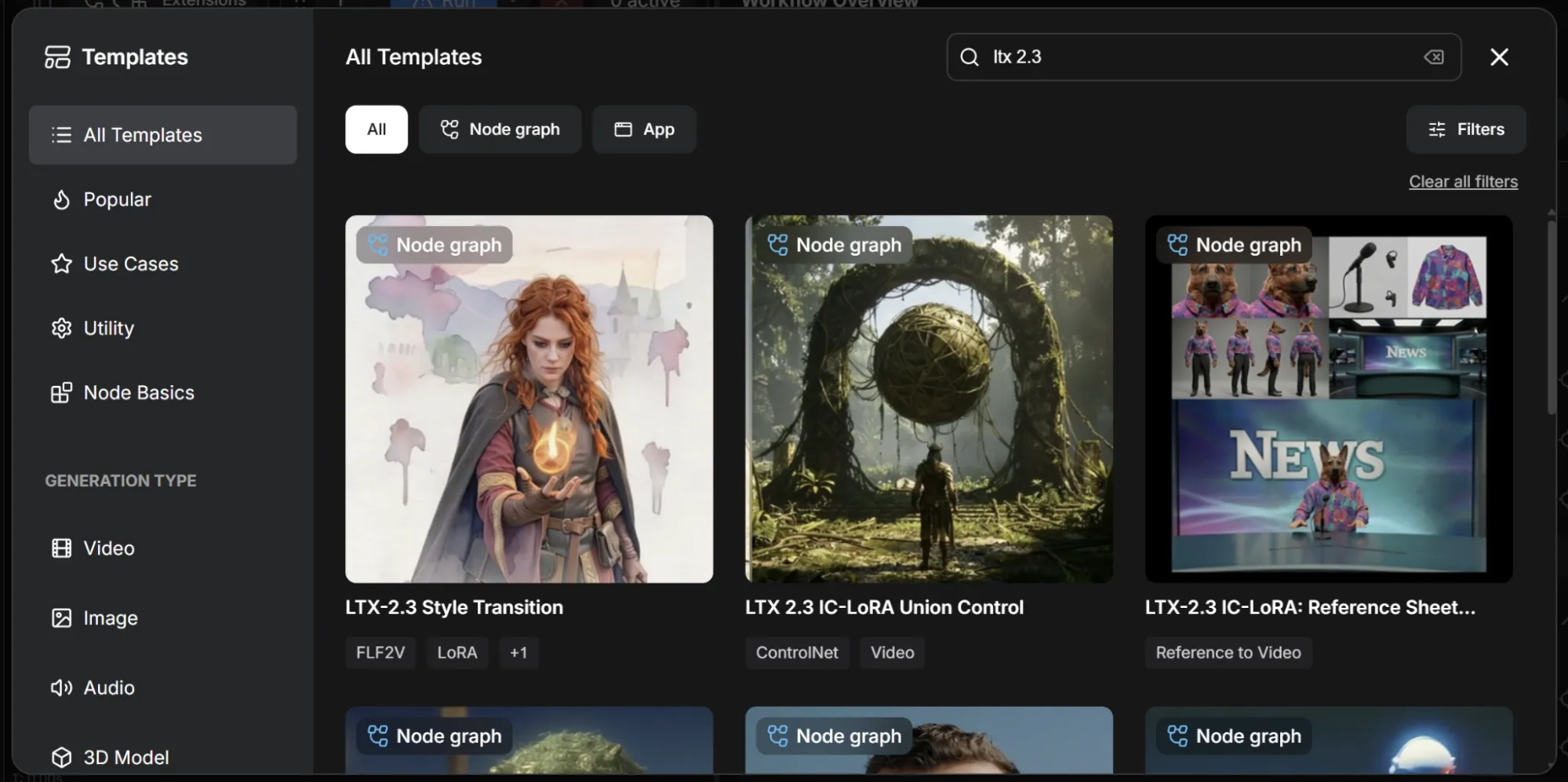
LTX-2.3 is natively supported in ComfyUI since the March 2026 update. All six workflow templates are built-in with no custom nodes required. Open ComfyUI Manager and update to version 0.16.1 or later before proceeding.
Loading the Official Workflow
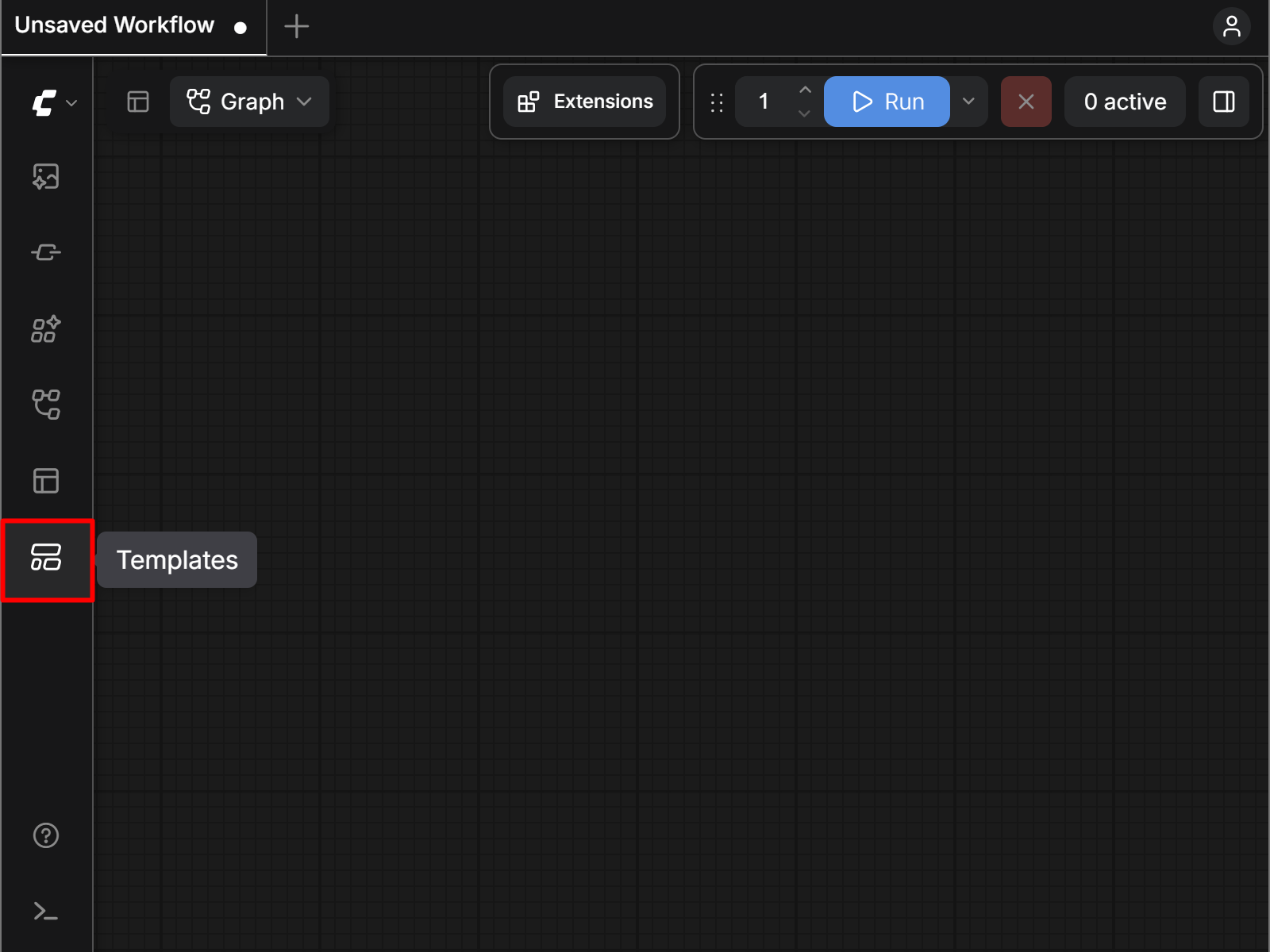
Open the Template Library in the ComfyUI interface.
Search for "LTX-2.3", and select a workflow. Each template handles all node connections automatically.
Download Model Files
For manual installation, download files from the Lightricks HuggingFace repository or through the ComfyUI interface.
Common model files include:
- Checkpoint:
- ltx-2.3-22b-dev-fp8.safetensors
- Place in ComfyUI/models/checkpoints/
- Text Encoder:
- gemma_3_12B_it_fp4_mixed.safetensors
- Place in ComfyUI/models/text_encoders/
- LoRA (optional):
- ltx_2.3_22b_distilled_1.1_lora_dynamic_fro09_avg_rank_111_bf16.safetensors
- Place in ComfyUI/models/loras/
- Upscaler (optional):
- ltx-2.3-spatial-upscaler-x2-1.1.safetensors
- Place in ComfyUI/models/latent_upscale_models/
How to Use LTX-2.3 in ComfyUI
Configuring Your First Text-to-Video Generation
Load the LTX-2.3 T2V template and confirm the checkpoint has loaded in the model loader node. A good starting point is 1280x720 output at 81 frames (roughly 3.4 seconds at 24fps).
Key settings before your first run:
- Steps: 4-8 for distilled, 20-50 for dev. Start at the lower end of each range.
- CFG Scale: The default of 3.0-3.5 works for most prompts. Keep between 2.0-5.0.
- Resolution: Generate at your target resolution from the start. Upscaling from 720p produces worse results than generating at 1080p directly.
Prompting Tips for LTX-2.3
Lead with motion and camera behavior; the model follows motion instructions more reliably when they come first. "Camera slowly tracks forward, a woman walks through a misty forest" outperforms "A woman in a misty forest, cinematic mood."
Limit each prompt to one or two actions. Asking the model to choreograph four events in sequence will not produce reliable results.
For negative prompts, listing common artifacts helps: "blurry motion, flickering, frozen frames, watermark, inconsistent lighting."
The LTX API: Generating Video Without a Local GPU
How the LTX API Works
The LTX API is Lightricks' managed REST API for video generation. It runs LTX-2.3 on Lightricks' infrastructure and returns an MP4. No local GPU is needed. Authentication uses a bearer token, and the endpoint accepts a text prompt or image input. Billing is per second of output video, not per request or compute time.
The API exposes four model tiers:
ltx-2.3-fastltx-2.3-proltx-2.5-fastltx-2.5-pro
LTX API Pricing
| Model | 720p | 1080p | 1440p | 4K |
|---|---|---|---|---|
| LTX-2.3 Fast (T2V / I2V) | $0.03/sec | $0.06/sec | $0.12/sec | $0.24/sec |
| LTX-2.3 Pro (T2V / I2V) | $0.04/sec | $0.08/sec | $0.16/sec | $0.32/sec |
| LTX-2.3 Pro - Audio-to-Video (A2V) | $0.10/sec | $0.10/sec | N/A | |
| LTX-2.5 Fast | $0.09/sec | $0.13/sec | $0.19/sec | $0.30/sec |
| LTX-2.5 Pro | $0.12/sec | $0.17/sec | N/A | |
| Extend / Retake | $0.10/sec | $0.10/sec | N/A |
Official pricing from October 2026. Subject to change.
Using the LTX API from the Command Line
- Get an API key from the LTX Developer Console.
- Build your request:
- Add the bearer token to the
Authorizationheader. - Select the right model.
- Write a prompt.
- Configure duration, resolution, and FPS.
- Add the bearer token to the
- Send your request.
Bash example (Mac, Linux)
curl -X POST https://api.ltx.video/v1/text-to-video \
  -H "Authorization: Bearer YOUR_API_KEY" \
  -H "Content-Type: application/json" \
  -d '{
    "model": "ltx-2.3-fast",
    "prompt": "Camera slowly tracks forward through a misty forest at golden hour, shafts of light through tall trees, cinematic depth of field",
    "duration": 5,
    "resolution": "1920x1080",
    "fps": 24
  }'
PowerShell example (Windows)
$headers = @{
    "Authorization" = "Bearer YOUR_API_KEY"
    "Content-Type"  = "application/json"
}

$body = @{
    model      = "ltx-2.3-fast"
    prompt     = "Camera slowly tracks forward through a misty forest at golden hour, shafts of light through tall trees, cinematic depth of field"
    duration   = 5
    resolution = "1920x1080"
    fps        = 24
} | ConvertTo-Json

Invoke-RestMethod -Uri "https://api.ltx.video/v1/text-to-video" -Method Post -Headers $headers -Body $body
The endpoint returns a URL to the generated MP4. For longer clips or production workloads, the async /v2/text-to-video endpoint returns a job ID immediately and lets you poll for completion rather than holding an open connection.
Using the Gemma API Node in ComfyUI
The Gemma API Text Encoding node offloads prompt encoding to Lightricks' free API rather than running the Gemma 3 12B encoder locally. The FP4-mixed Gemma encoder occupies approximately 8GB of VRAM; the full BF16 encoder requires significantly more. Offloading via the API node removes that overhead entirely.
To use it, replace the local Gemma encoder node in your workflow with the Gemma API Text Encoding node (installed as part of ComfyUI-LTXVideo). Pass your prompt and it returns embeddings ready for the sampler. The call completes in under a second with no token limits.
LTX API, Cloud GPU, or Local: How to Choose
| Factor | LTX API | Cloud GPU | Local GPU |
|---|---|---|---|
| Setup | API key only | CLI install, model downloads | ComfyUI install, model downloads |
| VRAM needed | None | 16GB-80GB | 16GB-80GB |
| Cost | $0.06 (Fast) / $0.08 (Pro) | A100 at $1.09/hr | Hardware amortized |
| Workflow control | REST parameters only | Full ComfyUI node graph access | Full ComfyUI node graph access |
| LoRA / IC-LoRA support | Limited | Yes, via ComfyUI nodes | Yes, via ComfyUI nodes |
| Minimum resolution | 1080p | Any | Any |
| Best for | Low volume, no GPU, quick integration | High volume without upfront hardware cost | Ongoing use, hardware already owned |
Running LTX-2.3 on Thunder Compute
Running the 22B dev model at 1080p or above requires 40GB+ of VRAM, which puts it outside of consumer hardware.
Thunder Compute offers a one-click ComfyUI template. Run it using an RTX A6000 to build and test workflows at $0.35/hr, save it to a snapshot for later use or to upgrade to more powerful hardware (A100 for $1.09/hr, H100 for $3.20/hr).
Getting started is simple:
- Install the CLI
- Run
tnr create --template comfy-ui - Choose your instance specs
- Connect with
tnr connect 0 - Launch with
start comfyui.
Last Thoughts on LTX-2.3 ComfyUI
LTX-2.3 is a strong open-source option for AI video generation. For users hitting VRAM limits on the dev model, a cloud A100 is the cleaner path than quantization.
FAQ
Does LTX-2.3 Require Custom Nodes in ComfyUI?
No. LTX-2.3 has been natively supported since the March 2026 ComfyUI update. All six workflow templates are built in and accessible through the Template Library. If you see missing nodes after loading a workflow, the most likely cause is an outdated ComfyUI version.
How Much VRAM Do I Need for LTX-2.3 in ComfyUI?
The 22B dev model in BF16 requires 32GB+ per official Lightricks documentation. The FP8 checkpoint can run on 16GB when paired with the FP4-mixed Gemma encoder and sequential CPU offloading. For comfortable 1080p output, 40GB is the practical minimum for the dev model.
What Is the LTX API and How Is It Priced?
The LTX API is Lightricks' managed REST endpoint for video generation without a local GPU. LTX-2.3 Fast costs $0.06 per second at 1080p; Pro costs $0.08 per second. A 10-second clip at 1080p with the Fast model costs $0.60. Billing is per second of output video.
What Are the Six Native ComfyUI Workflows for LTX-2.3?
Text-to-Video (T2V), Image-to-Video (I2V), First-Last Frame to Video (FLF2V) for interpolated transitions, Image-Audio-to-Video (IA2V) for lip sync, IC-LoRA Union Control for depth and pose-guided generation, and ID-LoRA for personalized speaking avatar video with synchronized audio.
What Is the Gemma API Text Encoding Node?
A ComfyUI node that offloads prompt encoding to Lightricks' free hosted API instead of running the Gemma 3 12B encoder locally. This removes the encoder's VRAM overhead (approximately 8GB for the FP4 variant, significantly more for BF16) and lets the encoding call complete in under a second with no token limits.