Given their differences, choosing between Google Cloud Platform (GCP) and Thunder Compute should be easy:
- GCP provides enterprise services at premium prices
- Thunder Compute simplifies GPU access for up to 78% less.
The real decision is if you'd rather spend budget on overhead or training models.
This article explains everything you need to know about Thunder Compute and Google Cloud, covering pricing, setup, and performance.
Takeaways
- GPUs cost up to 78% less on Thunder Compute than on GCP (A100 at $1.09/hr vs $5.03/hr on GCP).
- Thunder Compute lets you launch GPU instances in 30 seconds using VS Code, compared with days of setup on GCP.
- GCP requires quota approvals and complex configuration; Thunder Compute offers one-click deployment.
How GCP Works
GCP takes the traditional hyperscaler approach to GPU computing. They offer GPU instances through Compute Engine with options like A100, H100, T4, and L4 GPUs with highly customizable virtual machines.
GCP's strategy revolves around integration with their broader ecosystem. You get access to services like Vertex AI, BigQuery, and their managed ML tools. It's great if you use their GPUs as part of a larger Google Cloud workflow.
Their GPU offerings come in predefined machine types, from 1 GPU up to 16 A100s in a single VM. The focus is on enterprise customers who need that level of integration and are willing to pay premium prices for it.
Google Cloud Platform positions itself as a complete solution in which GPU compute is just one piece of a larger enterprise puzzle.
But here's where it gets tricky. GCP's approach assumes that you want to buy into their entire ecosystem. If you just need GPU cloud resources for training models, you're paying for a lot of services you might never use.
What Thunder Compute Does and Our Approach
Thunder Compute is built for developers who want powerful GPU access without the complexity or cost of traditional cloud providers. Our approach is simple: we provide the best GPU experience at the lowest possible price.
Thunder Compute offers on-demand GPU instances that launch in seconds. We support RTX A6000, A100 80GB, and H100 80GB GPUs with up to 8 GPUs per instance.
- VS Code integration - you can connect directly to your GPU instance and start coding right away. No SSH setup, no driver installation, no configuration headaches.
- Persistent storage included - your data and environment persist between sessions. You can take snapshots of your entire setup and restore them later.
- Swap GPU easily - Scale with one click.
The cheapest cloud GPU providers often sacrifice reliability or features to hit low prices. We've taken a different approach by building software that gets the most from hardware, letting us pass those savings to you.
Our pricing model is transparent and simple: you pay per minute for what you use.
Pricing and Cost Comparison
The difference becomes crystal clear when you look at pricing.
GCP charges about $10.98 per hour for each H100 GPU when you factor in the required VM costs (prices vary based on several factors including region and demand).
- Eight-GPU H100 instances run about $88.48 per hour.
- Single A100 80GB instances cost about $5.03/hr on the a2-ultragpu-1g instance.
Thunder Compute offers 80GB A100s at $1.09 per hour and H100 instances at $3.20 per hour all-in.
| GPU Type | GCP Price/Hour | Thunder Compute Price/Hour | Savings |
|---|---|---|---|
| RTX A6000 | N/A | $0.35 | N/A |
| A100 80GB | $5.03 | $1.09 | 78% |
| H100 80GB | $10.98 | $3.20 | 71% |
But GCP's pricing gets worse when you add up the hidden costs. You pay separately for the VM compute, storage, networking, and data egress. Those "small" charges add up fast when you're training AI models regularly.
Thunder Compute keeps pricing simple by bundling high-speed networking, snapshots, and developer tools in the quoted rate, with straightforward storage options and no complex add-on fees like GCP.
For a typical AI startup running experiments and training models, this cost savings can mean the difference between burning through funding on infrastructure and investing it in product development.
The math is simple: You get five to seven times more GPU hours for the same cost with Thunder Compute.
Setup Complexity and Developer Experience
GCP Learning Curve
Setting up GPU instances on GCP can be difficult, especially if you're new to Google Cloud. First, you need to request GPU quotas, which can take days or even weeks to approve. Then you're on to complex VM configurations, networking setup, and driver installations.
Developers have spent entire days just trying to get a working GPU environment on GCP. A100 driver issues and troubleshooting CUDA problems on a cloud VM are nobody's idea of fun.
Setup experience
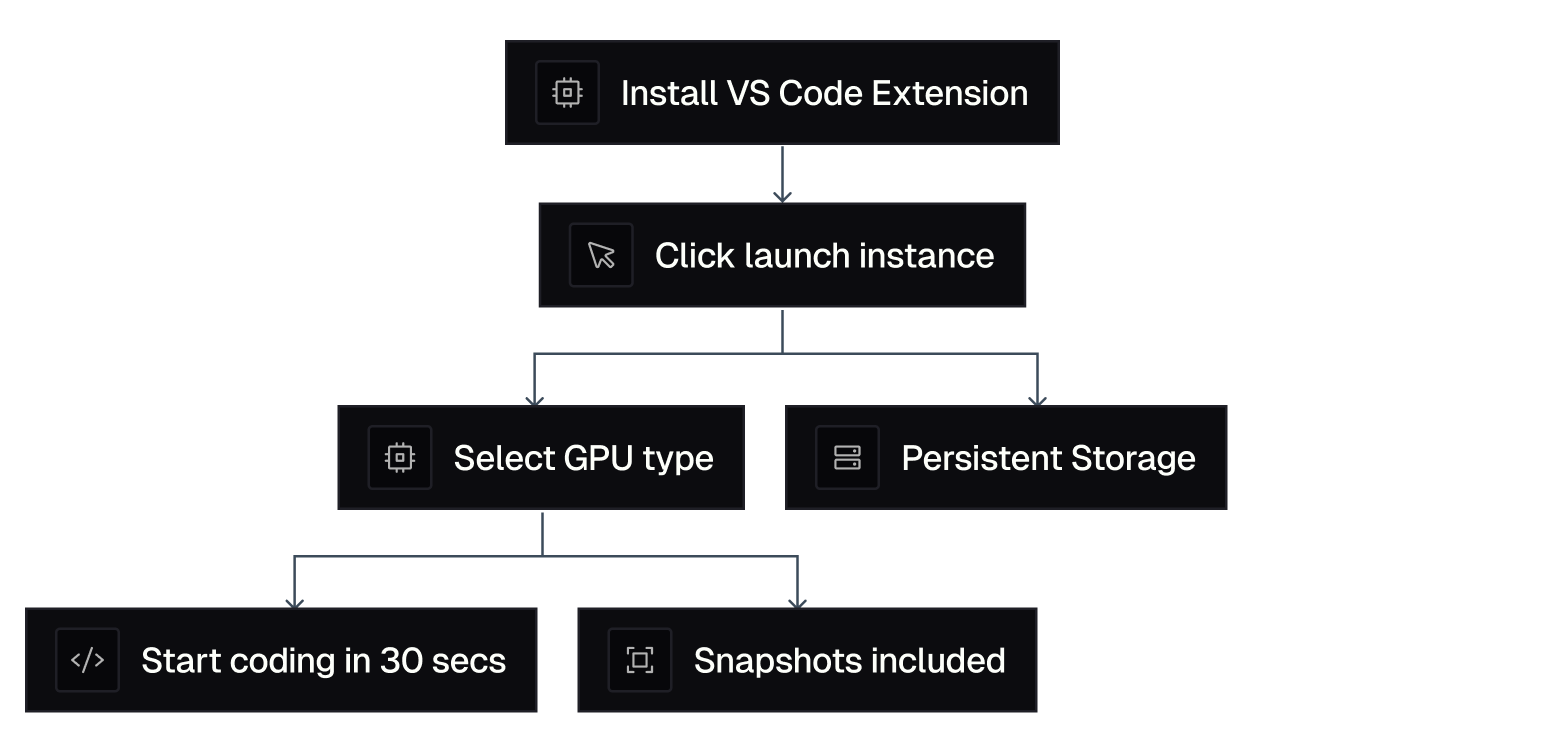
Thunder Compute gets rid of that friction, spinning up an instance is this simple:
- Install our VS Code extension.
- Click "Launch Instance."
- Select your GPU type.
- Start coding in less than 30 seconds.
And here's a look at GCP setup:
- Create Google Cloud account and billing.
- Request GPU quotas and wait for approval.
- Go through complex console to create VM.
- Configure networking and firewall rules.
- SSH into instance and install CUDA drivers.
- Set up development environment manually.
- Debug and troubleshoot configuration issues.
The difference in developer experience is night and day. We've optimized every step of the process because we know your time is better spent building models than fighting infrastructure.
That developer experience work includes providing context-rich error messages to easily solve errors with LLMs, instead of sending users through generic cloud troubleshooting.
Performance and Scalability Features
GCP does offer impressive raw power. You can get as many as 16 A100s in a single VM and use their global network infrastructure. For massive enterprise workloads, that scale can be valuable.
But most AI developers don't need 16 GPUs in a single instance. They need flexible, cost-effective access to one to four GPUs that they can scale up or down based on their current project needs.
Thunder Compute focuses on the sweet spot that covers 90% of AI development use cases. Our instances support one to four GPUs with the ability to swap hardware configurations on-the-fly. This means you can upgrade from an A100 to an H100 for a bigger training job in just one click.
And our persistent storage means that your datasets and model checkpoints survive between sessions. You can stop an instance when you're not using it and restart exactly where you left off. Try doing that smoothly on GCP.
We also provide high-speed networking (7 to 10 Gbps) that's optimized for ML workloads. Fast data transfer matters when you're moving large datasets or saving frequent checkpoints during training.
The ideal GPU cloud needs to balance performance with cost-effectiveness. Thunder Compute delivers enterprise-grade performance without the enterprise complexity or pricing.
Why Thunder Compute Is a Better Choice
Thunder Compute delivers what most AI developers need: reliable, affordable GPU access.
The 71-78% cost savings alone make Thunder Compute compelling, but it's the combination of price and usability that makes us the better choice.
GCP makes sense if you're a large enterprise that needs deep integration with Google's ecosystem. Otherwise, Thunder Compute is the obvious choice.
To see how GPU-first platforms are undercutting legacy tech, check out: What is a Neocloud? The Rise of GPU-Only Clouds.