Forge Neo UI is an AI image and video generation app that offers a simpler experience than ComfyUI along with flexibility not found on popular providers (think ChatGPT, Claude or Gemini).
As the newest version of Forge UI, Forge Neo UI expands model support, and improves integration with modern workflows. More importantly, it's frequently updated bringing life to the Forge project, (the original Forge UI was last updated over a year ago).
This guide covers Forge Neo basics, its use cases, and how to use it on Thunder Compute with minimal setup.
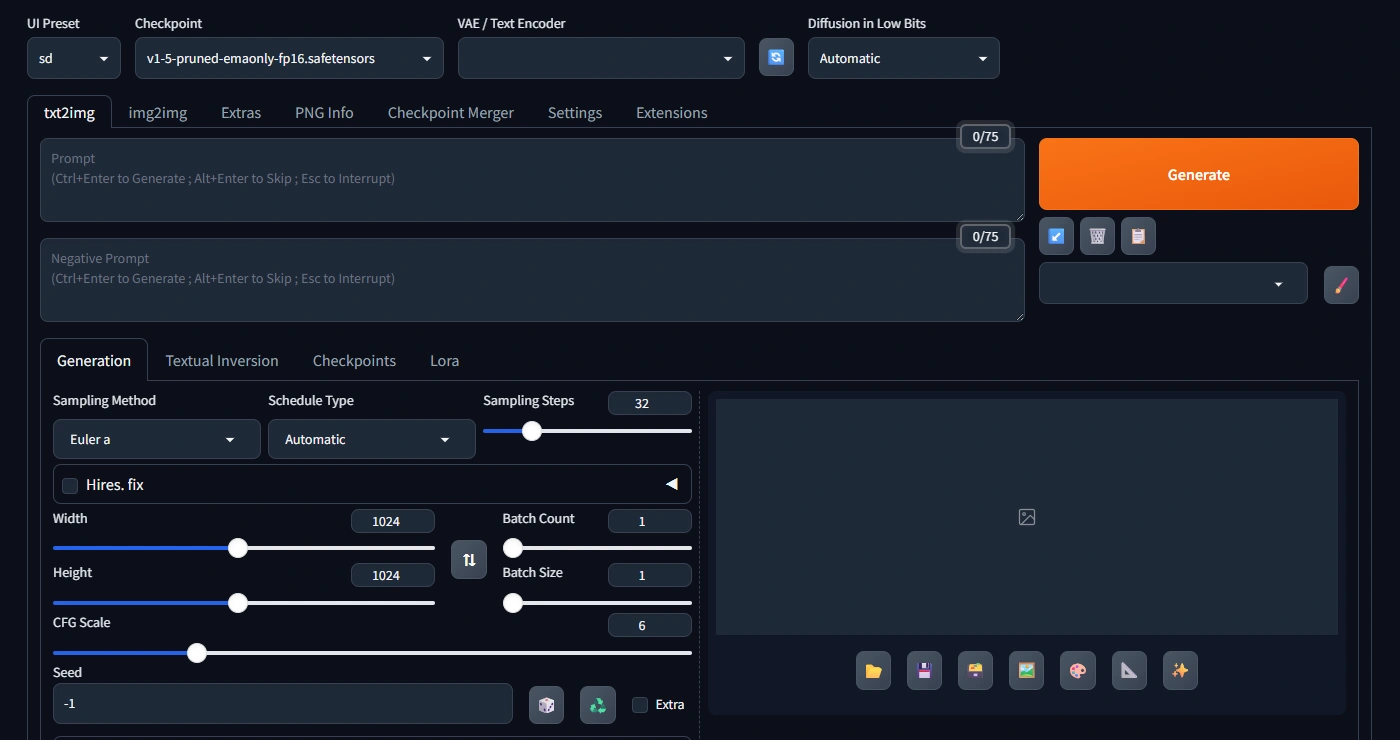
Forge Neo: Supported Models
Forge Neo UI is incredibly flexible allowing image and video generation with many popular models. Below is an overview of the current supported models.
| Model | Type | Architecture | Characteristics | Min. VRAM | Recommended VRAM |
|---|---|---|---|---|---|
| SD 1.5 | Image | UNet Latent diffusion |
- Foundational model - Largest LoRA and extension ecosystem - Best at 512px |
4 GB | 6 GB |
| SDXL | Image | Dual UNet Latent diffusion |
- Improved prompt adherence - 1024px native |
8 GB | 10 GB |
| Lumina-Image-2.0 | Image | DiT (diffusion transformer) | - High aesthetic quality - Strong text rendering - Supports multilingual prompts - Research-grade outputs |
12 GB | 16 GB |
| FLUX Dev | Image | Flow matching transformer (12B) | - Great photorealism - Excellent prompt adherence - For non-commercial use |
16 GB | 24 GB |
| FLUX Kontext | Editing | Flow matching transformer (12B) | - Reference-image-conditioned editing - Preserves subject identity across edits - Strong style transfer |
16 GB | 24 GB |
| Z-Image | Image | DiT Flow matching |
- Efficient high-resolution synthesis - Strong structural coherence - Optimized for commercial workflows |
12 GB | 16 GB |
| Z-Image Turbo | Image | Distilled DiT | - Distilled variant of Z-Image - Much faster - Slight quality decrease |
10 GB | 12 GB |
| FLUX.1 Klein 4B | Image | Flow matching transformer | - Lightweight FLUX variant - Less VRAM needed - Good quality-to-cost |
8 GB | 12 GB |
| FLUX.1 Klein 9B | Image | Flow matching transformer | - Mid-tier FLUX variant - Closer to full FLUX quality - Better prompt fidelity than 4B |
12 GB | 16 GB |
| Ernie-Image | Image | DiT (Baidu) | - Chinese prompt support - High quality for Asian art styles - Multilingual |
12 GB | 16 GB |
| Wan 2.2 T2V | Video | Video DiT Text-to-video |
- Text-to-video generation - Produces short clips (5s max) - Strong motion coherence |
16 GB | 24 GB |
| Wan 2.2 I2V | Video | Video DiT Image-to-video |
- Animates still images - Preserves subject appearance - Natural motion from a frame |
16 GB | 24 GB |
| Qwen-Image | Image | Multimodal transformer (Alibaba) | - Strong multilingual and Chinese support - High quality - Instruction-following generation |
16 GB | 24 GB |
| Qwen-Image-Edit | Editing | Multimodal transformer (Alibaba) | - Instruction-based image editing - Understands natural language edit commands - Preserves non-edited regions |
16 GB | 24 GB |
| Anima | Video | Video diffusion AnimateDiff |
- Animation and motion synthesis - Supports looping outputs |
12 GB | 16 GB |
| Krea 2 Raw | Image | Single-stream DiT (12B) Flow matching |
- Undistilled base model - Highest output diversity - Designed as a LoRA training base - 52-step inference |
16 GB | 24 GB |
| Krea 2 Turbo | Image | Distilled single-stream DiT (12B) Flow matching |
- Distilled variant of Krea 2 Raw - 8-step inference, ~2s at 2K - Ranked #1 indie lab on Artificial Analysis - Supports style LoRAs trained on Raw |
10 GB | 16 GB |
Forge Neo: Use Cases
Forge Neo UI accomplishes a wide spectrum of creative tasks.
- Iterating concepts by generating dozens of variations from a single prompt in batch mode.
- Inpainting and outpainting to extend or edit images at full resolution.
- Preparing print-quality assets with the included upscaling pipeline, which supports Real-ESRGAN and Tile Diffusion.
- Producing short looping clips or animating still images.
Because the UI consolidates all these workflows, teams can use a single tool rather than juggle several applications.
A History of Stable Diffusion UIs
Stable Diffusion UIs have gone through several distinct generations, each solving problems the previous one left open. A great way to understand where Forge Neo fits is to take a brief look at the ecosystem it emerged from.
Automatic1111
Launched in 2022, AUTOMATIC1111 (often shortened to A1111) is a web-based Stable Diffusion UI that defined the standard for community-driven image generation tools.
It introduced the concept of a browser-accessible local server with an extensions manager, txt2img and img2img functionality, and a growing library of community scripts. For years it was the entry point to self-hosted diffusion models.
A1111's was pushed to its limits as models grew larger and more diverse. Being built around SD 1.5, adapting it to SDXL and later architectures required convoluted workarounds. Memory management was manual, performance was inconsistent across GPU generations, and the codebase became difficult to maintain.
Forge UI
Developed by lllyasviel, Forge UI was a response to A1111's performance ceiling. As the direct ancestor of Forge Neo they share a lot in terms of design philosophy.
It introduced a rewritten backend that applied GPU memory optimization, dramatically reducing VRAM requirements for large models. It could often run a workflow that required 24 GB of VRAM in 8 GB or less, supporting a wider range of hardware.
Forge UI kept near-full compatibility with A1111 extensions, making it easy for existing users to migrate. Its architecture also made it easier to add support for new model families, which is how it became one of the first UIs with reliable FLUX support.
ComfyUI
ComfyUI is fundamentally different to both A1111 and Forge. Rather than presenting a simple form UI, it exposes the diffusion pipeline as a node graph, where each processing step is a draggable node that can be wired to any other.
This modular approach gives users precise control over the generation process and makes it easier to work with complex pipelines.
The downside is a steeper learning curve, as ComfyUI is significantly more demanding than Forge-based alternatives. However, for those that put in the time it provides advanced workflows, custom pipeline research, and flexible production environments.
Forge Neo UI
Forge Neo UI has a simplified interface, and support for video generation models. Memory management is further improved over the original Forge, and the extension API is more stable, making third-party integrations more reliable.
Forge Neo is the most complete current option for a capable, actively maintained interface without ComfyUI's node-graph complexity.
Running Forge Neo on Thunder Compute Instances
Thunder Compute offers a Forge Neo instance template that provisions a GPU instance ready to start generating images.
Avoid setup and start working with Forge Neo in minutes. Thunder Compute instances give you access to high-end GPUs like the RTX A6000 at $0.35/hr, which means generation times are fast and large SDXL or FLUX models load without memory pressure.
For a broader overview of running Stable Diffusion in the cloud, see the Thunder Compute guide to running Stable Diffusion.
Setup
The easiest way to launch a Forge Neo instance is by running a few commands in the CLI:
- First, install tnr.
- Open a fresh terminal.
- Run
tnr create --template forge-neoand choose your instance specs. - Run
tnr connect 0where 0 is the default instance ID. - Run
start-forgeneowhich launches Forge Neo and outputs a link to access the UI. This might take a minute or two.
Installing New Models
By default the Forge Neo template includes the basic Stable Diffusion model. If you want to add new ones you have to download them to your running instance.
You can find download links for all supported model checkpoints, LoRAs, and supporting files in the Forge Neo model download index.
For example, to install SDXL you would need to:
- Open a terminal
- Run
tnr connect 0(0 is the default instance ID). - Run commands provided below to download models into the appropriate directories.
Download Model Assets - SDXL Turbo
Running this command will download assets to their respective directories.
wget -P ~/ForgeNeo/models/Stable-diffusion \
  "https://huggingface.co/stabilityai/sdxl-turbo/resolve/main/sd_xl_turbo_1.0_fp16.safetensors" & \
wget -P ~/ForgeNeo/models/VAE \
  "https://huggingface.co/madebyollin/sdxl-vae-fp16-fix/resolve/main/sdxl_vae.safetensors" & \
wait
Using New Models
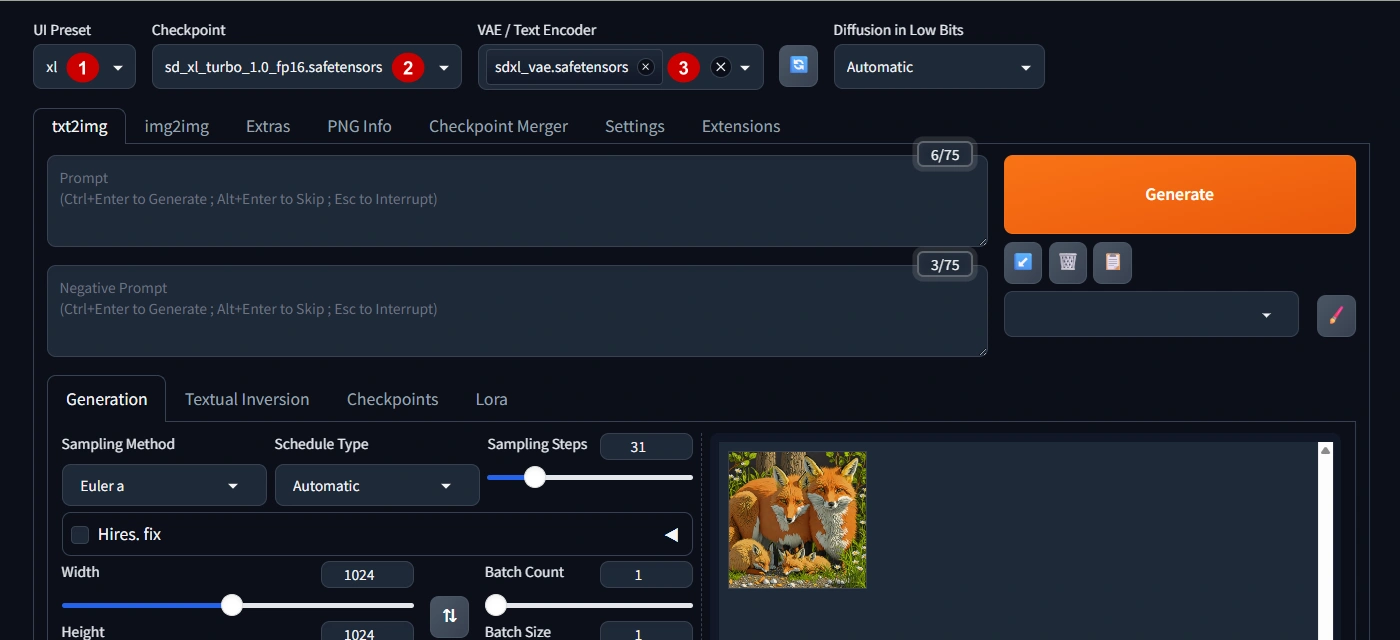
Once a new model is installed, you just have to select it in Forge Neo UI.
- Select the UI Preset.
- Choose the desired Checkpoint.
- Select the Text Encoder and, if necessary, the VAE
Downloading Output Files
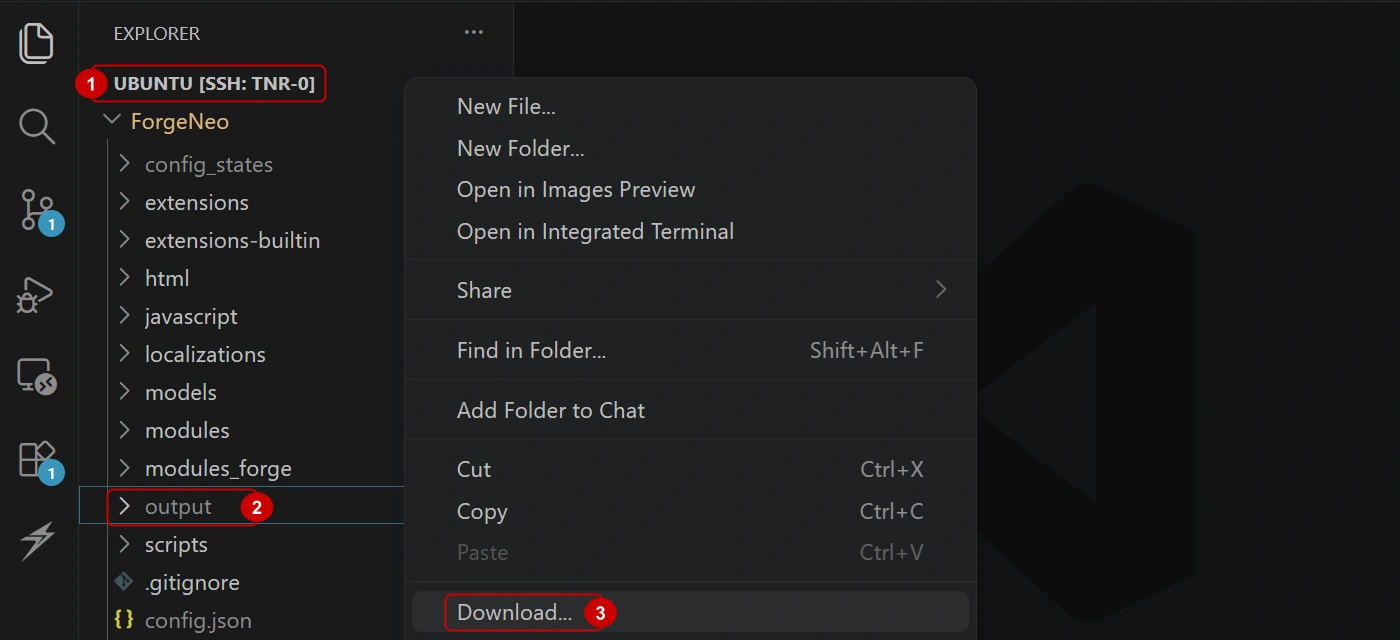
The Thunder Compute VS Code extension is the easiest way to download generated images from the instance to your PC.
- Connect to your instance through the VSCode extension.
- Right click the files to download. In this case the entire output folder.
- Click "Download" and choose the target folder.
You can also download files using tnr in the CLI.
Final Thoughts on Forge Neo UI
Forge Neo UI is currently the strongest choice if you want a maintained, high-performance Stable Diffusion interface without the steep ramp of ComfyUI.
It handles the full range of modern model architectures, supports both image and video workflows, and has a growing extension ecosystem.
If you want to try Forge Neo without a lengthy local setup, launch a Thunder Compute instance from the Forge Neo template and start generating in minutes.