

Installation
Click the following links to access the Thunder extension: You must have already installed the corresponding editor for each link to work.Authentication
You may be automatically prompted to login. If not, open the command palette withCtrl + Shift + P (or Cmd + Shift + P on macOS) and run Thunder Compute: Login.
Your browser will open automatically to complete authentication.
Add a Payment Method
In the console, add a payment method to your account.Using The Extension
You can create instances through the console or directly through the extension like so: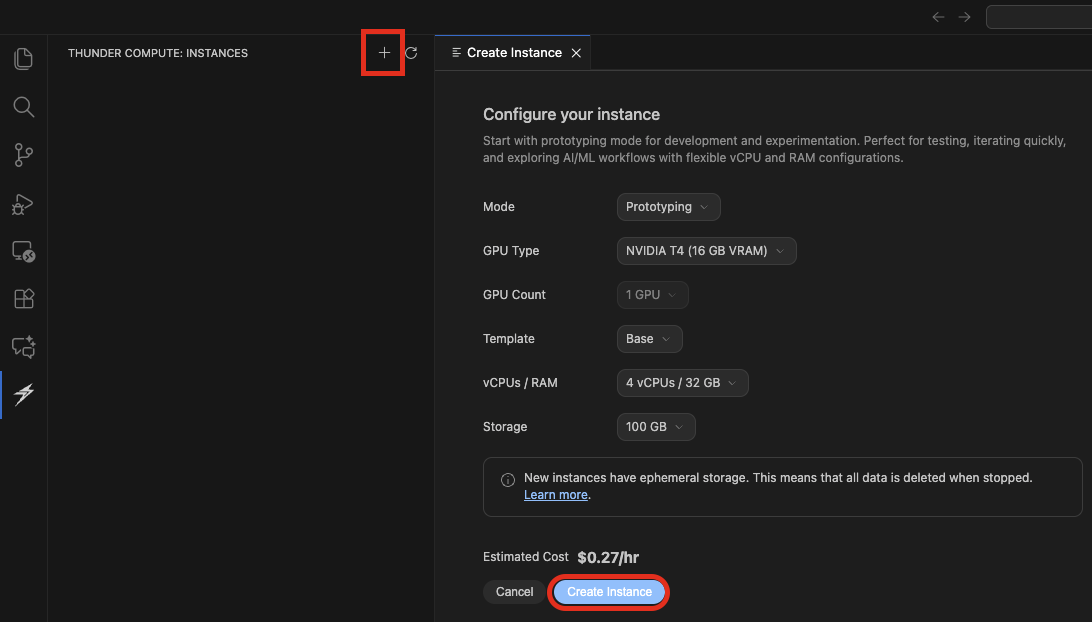
Connect button next to your instance, shaped like two arrows pointing towards each other.
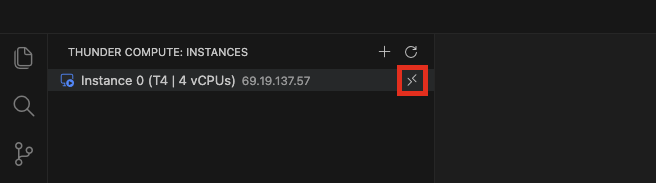
If connecting to the instance fails, check that you have the remote-ssh extension installed on your editor.

Next Steps
- Check the pricing page for current GPU instance sizes and pricing
- Explore Technical Specifications for hardware, networking, and storage details
- Learn how to transfer files, create snapshots, and more in the Operations section
- Learn how to Run a Jupyter Notebook