Fine-tuning LLMs used to mean waiting hours for a run to finish and watching GPU memory creep toward the limit. Unsloth AI makes fine-tuning faster and leaner without sacrificing output quality.
This guide covers what Unsloth is, how to install it, and how to run your first fine-tuning job. It also covers Unsloth Studio for those who prefer a no-code interface, and looks at how Thunder Compute can remove the hardware barrier entirely.
What Is Unsloth
Unsloth is an open-source fine-tuning library for LLMs. It's built to make supervised fine-tuning faster and more memory-efficient. The library rewrites core attention and backpropagation kernels by hand in Triton, bypassing much of the overhead that frameworks like Hugging Face Transformers introduce on NVIDIA GPUs.
In practice, Unsloth reports fine-tuning runs 2x–5x faster than a standard Hugging Face + bitsandbytes setup, with 50–70% less VRAM depending on the model and configuration. That allows models to run on a single consumer-grade or mid-tier GPU.
Unsloth supports a wide range of popular open-weight models out of the box (including the Llama series, Mistral, Phi, Gemma, Qwen3, and GLM-5.2). Making it straightforward to fine-tune those models with the same efficient pipeline.
Key Features of the Unsloth Fine-Tuning Tool
Before jumping into installation, it helps to understand what the Unsloth fine-tuning tool provides:
- Custom Triton kernels: Hand-written kernels for attention, RoPE embeddings, cross-entropy loss, and backpropagation that are faster than compiled alternatives.
- 4-bit and 16-bit quantization: Native support for QLoRA (4-bit) and LoRA (16-bit) fine-tuning without quality degradation.
- Long context support: Extended context windows without proportional memory increases.
- GGUF and vLLM export: Trained adapters can be exported directly to GGUF for local inference with llama.cpp or merged for deployment with vLLM.
- Broad model coverage: Pre-patched support for the most widely used open-weight model families.
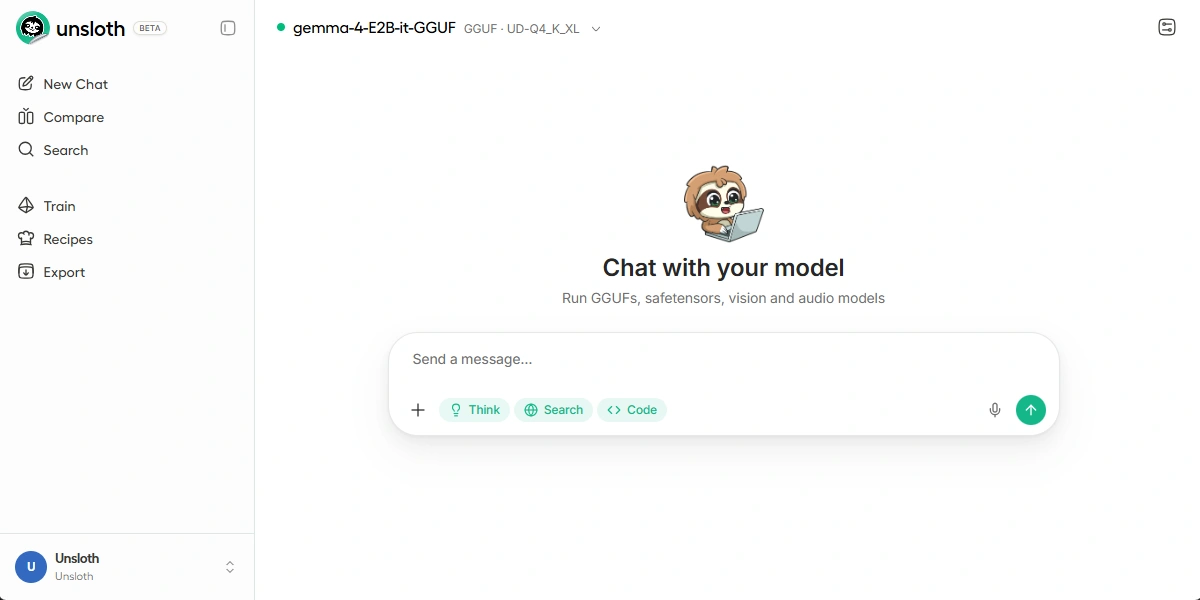
- Unsloth Studio: A visual, notebook-style interface for users who prefer not to write code.
Unsloth Studio: The No-Code Option
Unsloth Studio is a browser-based interface that wraps the same underlying engine as the Python library. It provides visual workflows to upload datasets, select base models, configure training hyperparameters, and monitor runs.
Studio is useful for teams that want to experiment with fine-tuning without committing to a full Python environment, or for anyone who wants to tinker quickly with dataset and hyperparameter choices. It connects to the same model hub and supports the same export formats as the CLI-based workflow.
If you are comfortable with Python, the library offers more flexibility. If you want results without setup overhead, Studio is a reasonable starting point.
System Requirements
Unsloth runs best on NVIDIA GPUs with CUDA support. Intel GPUs and CPU-only inference are also supported for lighter workloads.
| Component | Minimum | Recommended |
|---|---|---|
| VRAM | 8GB | 16–24GB |
| CUDA | 11.8 | 12.1+ |
| Python | 3.9 | 3.10 or 3.11 |
| PyTorch | 2.0 | 2.2+ |
| OS | Linux | Ubuntu 20.04 / 22.04 |
AMD and Apple MLX should be supported soon.
How to Install Unsloth
Installation varies slightly depending on your CUDA version. The recommended approach uses conda to manage the environment cleanly.
To skip installation, create a Thunder Compute instance using the Unsloth template and access the data center GPUs.
Step 1: Create a Conda Environment
If not installed on your computer, first you need to get Conda.
conda create --name unsloth_env python=3.11 -y
conda activate unsloth_env
Step 2: Install PyTorch with CUDA
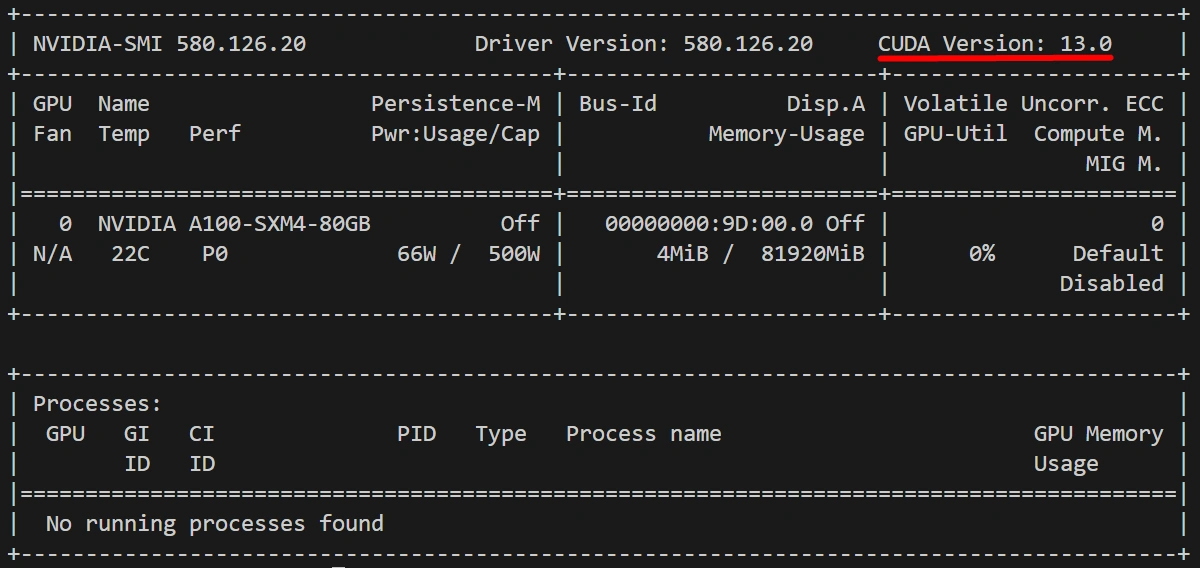
In your terminal run nvidia-smi to find your CUDA version and replace cu121 to match (cu118, cu121, or cu124).
pip install torch torchvision torchaudio --index-url https://download.pytorch.org/whl/cu130
Step 3: Install Unsloth
pip install "unsloth[colab-new] @ git+https://github.com/unslothai/unsloth.git"
pip install --no-deps "trl<0.9.0" peft accelerate bitsandbytes
Alternatively, for a stable release from PyPI:
pip install unsloth
To verify the installation:
python -c "import unsloth; print(unsloth.__version__)"
Troubleshooting Unsloth
| Issue | Likely Cause | Fix |
|---|---|---|
| CUDA out of memory | Batch size too large | Reduce per_device_train_batch_size to 1 |
triton import error |
Triton not installed or wrong version | pip install triton==2.1.0 |
| Slow training despite Unsloth | PyTorch version mismatch | Reinstall PyTorch matching your CUDA version |
| Model not found on Hugging Face | Private or gated repo | Run huggingface-cli login and accept model terms |
| NaN loss after a few steps | Learning rate too high | Reduce learning_rate to 1e-4 or lower |
Run Unsloth on Cloud GPUs with Thunder Compute
The biggest practical barrier to Unsloth fine-tuning is hardware. A GPU with 16GB or more of VRAM is ideal for anything beyond the smallest models, and consumer cards in that range are expensive.
Thunder Compute provides on-demand GPU instances accessible through VSCode, a CLI, or as a web app. You get a remote GPU that behaves like a local machine: install packages, run scripts, move files.
Thunder Compute offers a pre-built Unsloth Studio template with CUDA, PyTorch, and Unsloth already installed and tested. Select the template, choose your GPU, and within minutes you're loading your model and dataset. Per-minute billing means you only pay for active compute time, with no idle cost between experiments.
Last Thoughts on Unsloth
Unsloth cuts two of the biggest obstacles to LLM fine-tuning: slow training and high VRAM consumption. The performance gains are immediate regardless of where you run it. If hardware is the bottleneck, spin up a pre-configured Unsloth instance on Thunder Compute, run your fine-tuning job, and shut it down when you're done.
Now that you know how to accelerate your training with Unsloth, find the perfect model by checking out our guide to the best open-source LLMs.
FAQ
Does Unsloth work on Google Colab?
Yes. Unsloth provides Colab-specific installation instructions and notebooks. Free Colab GPUs (T4) can run smaller models in 4-bit mode, though VRAM limits restrict which models are feasible.
Can Unsloth fine-tune models larger than 70B parameters?
Yes, but it requires multiple GPUs or aggressive quantization. Models above 30B parameters in 4-bit mode need at least 24GB of VRAM. Multi-GPU support is available but less mature than single-GPU setups.
Is the Unsloth fine-tuning tool free to use?
The open-source version is free under the Apache 2.0 license. Unsloth also offers a paid Pro tier with additional features and support.
How does Unsloth compare to Hugging Face TRL without Unsloth patches?
Unsloth benchmarks at 1.5–2.5x faster training speed with 40–70% lower VRAM usage on equivalent hardware. Results vary by model architecture and batch configuration.
What export formats does Unsloth support?
GGUF (for llama.cpp), merged 16-bit weights, vLLM-compatible checkpoints, and standard Hugging Face safetensors format.
What models does Unsloth support?
Unsloth supports the Llama series, Mistral, Phi, Gemma, Qwen3, and GLM-5.2, among others. Most popular open-weight model families are pre-patched and ready to fine-tune out of the box.
What is Unsloth Studio?
Unsloth Studio is a browser-based no-code interface for fine-tuning. It wraps the same engine as the Python library and lets you upload datasets, select models, configure hyperparameters, and monitor runs without writing code.
Can I run Unsloth on a cloud GPU?
Yes. Thunder Compute offers a pre-built Unsloth Studio template with CUDA, PyTorch, and Unsloth pre-installed. Spin up an instance, run your fine-tuning job, and shut it down when done. No idle cost between experiments.