Runpod offers a broad GPU marketplace spanning P2P hardware and managed data center nodes, plus dedicated serverless inference products. Thunder Compute focuses on low-cost, persistent GPU instances for AI development.
This post covers Runpod's current pricing across GPUs, storage, and serverless, then compares it against Thunder Compute.
Key takeaways:
- Thunder Compute H100 80GB: $3.20/hr. Runpod H100 PCIe: $2.89/hr.
- Thunder Compute A100 80GB: $1.09/hr. Runpod A100 PCIe: $1.39/hr.
- Runpod bills per second. Thunder Compute bills per minute and emphasizes available managed capacity with storage included.
- Runpod network volumes cost $0.07/GB/month. Thunder Compute includes 100GB per GPU free.
- Runpod offers 30+ GPU types including the RTX 4090 at $0.69/hr. Thunder Compute focuses on RTX A6000, L40, A100, and H100.
Runpod GPU Pricing (September 2026)
Runpod's GPU Pods are dedicated instances available across 30+ regions with per second billing.
| GPU | VRAM | Price/hr |
|---|---|---|
| H100 PCIe | 80 GB | $2.89 |
| H100 SXM | 80 GB | $2.99 |
| A100 PCIe | 80 GB | $1.39 |
| A100 SXM | 80 GB | $1.49 |
| RTX 4090 | 24 GB | $0.69 |
| RTX A6000 | 48 GB | $0.53 |
| L40S | 48 GB | $0.99 |
| Last reviewed on September 1, 2026. | ||
Runpod Network Volume Pricing
Runpod charges separately for persistent storage through network volumes. The first 1TB costs $0.07/GB/month; storage beyond that drops to $0.05/GB/month. Network volumes persist between sessions but appear as a separate line item on every bill.
For teams storing large model checkpoints or datasets, this adds up quickly. 500GB of network volume storage runs $35/month before any compute. Thunder Compute includes 100GB per GPU at no extra charge, with additional running storage at $0.03/100GB/hr and snapshots at $0.05/GB/month.
Runpod Serverless Pricing
Runpod Serverless workers scale up when requests arrive and return to idle when jobs complete. Billing is per second of active worker time, making it cost-effective for inference workloads where persistent instances would sit idle between requests.
For the GPUs most relevant to mid-to-large model inference, Runpod Serverless rates are:
- A6000 (48GB): $1.22/hr equivalent
- A100 (80GB): $2.72/hr equivalent
- H100 (80GB): $4.55/hr equivalent
Runpod Serverless supports sync and async deployment models. It suits inference APIs and short scripts. For training or long-running development sessions, Runpod Pods give more direct environment control.
Thunder Compute vs Runpod: Side-by-Side
| Category | Thunder Compute | Runpod |
|---|---|---|
| H100 80GB on-demand | $3.20/hr | $2.89/hr (PCIe) |
| A100 80GB on-demand | $1.09/hr | $1.39/hr (PCIe) |
| Billing | Per minute | Per second |
| Storage included | 100GB per GPU | None included; network volumes $0.07/GB/month |
| Snapshot storage | $0.05/GB/month | $0.05/GB/month (standard tier) |
| IDE integration | VS Code, Cursor, Devin Desktop extensions | Pods (custom VMs), SSH, Jupyter |
| Serverless | Not available | Yes, per-second billing, scales to zero |
| GPU variety | RTX A6000, L40, A100 80GB, H100 PCIe | 30+ GPU types including consumer RTX cards |
| Egress fees | None | None |
| Last reviewed on September 1, 2026. | ||
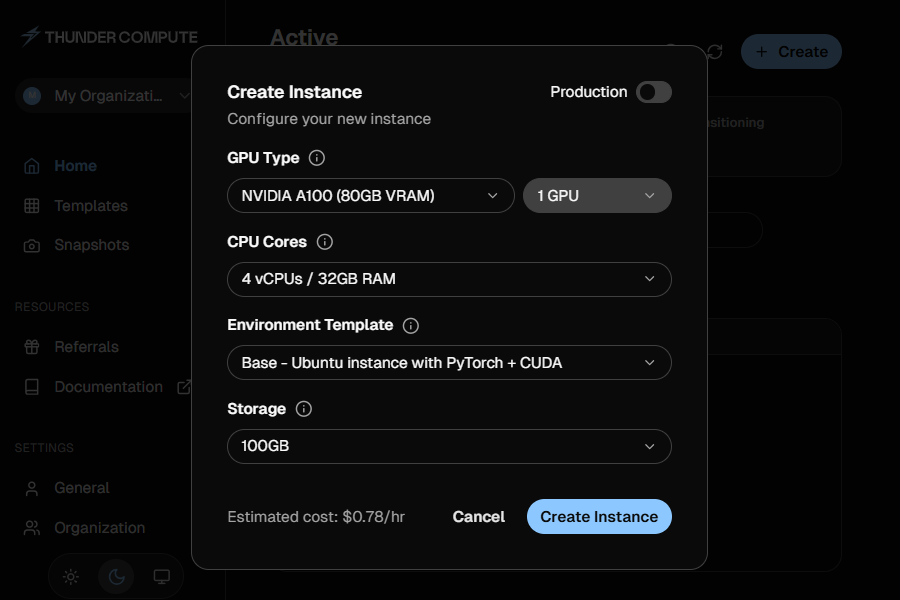 Instance creation on Thunder Compute
Comparing Per-Second and Per-Minute Billing
Runpod's per second billing only beats per-minute billing when a job ends within a few minutes. For any job running longer than 93 seconds at the same hourly rate, the billing granularity difference disappears. The real savings come from the hourly rate, not billing precision.
| Runtime | Runpod A100 per-ms at $1.39/hr | Thunder Compute A100 per-min at $1.09/hr | Lower Cost |
|---|---|---|---|
| 30 seconds | $0.012 | $0.018 | Runpod |
| 93 seconds | $0.036 | $0.036 | Same cost |
| 5 minutes | $0.116 | $0.091 | Thunder Compute |
| 1 hour | $1.39 | $1.09 | Thunder Compute |
Pods and Serverless on Runpod
Runpod Pods are VM-like instances where you control the environment, storage, and runtime. They work well for training, long-running development, and workloads that need direct GPU access. Serverless endpoints spin up workers on demand and scale to zero between requests, billing only for active compute time.
For training-heavy workloads where an IDE-based workflow matters, Thunder Compute is simpler. For serverless inference that handles traffic spikes without pre-provisioned capacity, Runpod Serverless is the right tool.
When to Choose Each Provider
Runpod suits teams that need consumer-grade GPUs like the RTX 4090, serverless inference endpoints that scale to zero, or specific global regions not covered by Thunder Compute. Its hardware variety across 30+ regions is a genuine advantage.
Thunder Compute suits teams running training or fine-tuning sessions lasting hours or days. Available A100 and H100 capacity, persistent storage included by default, and one-click VS Code, Cursor, and Devin Desktop integration make it a practical choice for developer-first workflows at the single-node level.
Last Thoughts on Runpod Pricing
Runpod's per second billing sounds appealing, but the billing granularity only matters for sub-minute jobs.
For A100 training and fine-tuning, Thunder Compute's lower hourly rate still moves the needle.
For H100 workloads, compare Runpod's lower headline rate against Thunder Compute's managed availability, storage, and IDE-first workflow.
FAQ
How Much Does an NVIDIA H100 Cost Per Hour on Runpod?
Runpod H100 PCIe is $2.89/hr and H100 SXM is $2.99/hr on-demand, billed per second. Thunder Compute offers H100 PCIe at $3.20/hr with per-minute billing and 100GB included at no extra charge.
Is Thunder Compute Cheaper Than Runpod?
Thunder Compute is cheaper for A100 80GB at $1.09/hr versus Runpod's $1.39/hr. Runpod's H100 PCIe headline rate is lower at $2.89/hr versus Thunder Compute at $3.20/hr. For H100 workloads, compare price against availability, storage, and workflow requirements.
How Much Does Runpod Charge for Network Volume Storage?
Runpod network volumes cost $0.07/GB/month for the first 1TB and $0.05/GB/month thereafter. Thunder Compute includes 100GB per GPU at no extra charge. Additional running storage costs $0.03/100GB/hr; snapshots cost $0.05/GB/month.
Does Runpod Offer More GPU Variety Than Thunder Compute?
Yes. Runpod offers 30+ GPU types including consumer cards like the RTX 4090 at $0.69/hr. Thunder Compute focuses on RTX A6000, L40, A100 80GB, and H100 PCIe for AI training and inference workloads.
Which GPU Cloud Is Better for ML Training?
Thunder Compute is better for training sessions running hours or days when managed availability, per-minute billing, 100GB included per GPU, and VS Code, Cursor, and Devin Desktop integration matter more than the lowest H100 headline rate. Runpod Serverless is better for variable-traffic inference that needs to scale to zero.
Does Runpod Bill Per Second or Per Minute?
Runpod Pods bill per second. Thunder Compute bills per minute. For any job running longer than 93 seconds at equivalent hourly rates, the granularity difference is negligible. The hourly rate gap has far more impact on total cost.
How Much Does Runpod Serverless Cost for H100 GPUs?
Runpod Serverless H100 costs $4.55/hr equivalent, billed per second of active worker time. A100 Serverless is $2.72/hr equivalent and A6000/A40 is $1.22/hr. Workers scale to zero when idle, so you only pay for active compute time.
What Is the Billing Breakeven Point Between Runpod and Thunder Compute?
At identical hourly rates, Runpod's per second billing saves money only for jobs under 93 seconds. Beyond that, Thunder Compute's lower $1.09/hr A100 rate makes it consistently cheaper regardless of billing granularity.