Running DeepSeek R1 locally sounds straightforward until you check the hardware requirements. The full 671B model demands hundreds of GB of VRAM, far beyond any consumer GPU.
This guide covers what R1 is, how to run it with Ollama, and how to use a cloud GPU for less than the API costs. Since R1's January 2025 release, DeepSeek has shipped V3.2 and V4 (April 2026) for general and coding workloads, but R1 remains the benchmark for open-weight chain-of-thought reasoning.
What Is DeepSeek R1?
DeepSeek R1 is an open-weight reasoning model from DeepSeek, a Chinese AI lab founded in 2023. It was the first open-weight model to rival OpenAI o1 on math, coding, and science benchmarks, and ships under an MIT license that allows commercial use and self-hosting.
What sets R1 apart from standard chat models is its chain-of-thought reasoning. Before answering, the model generates visible thinking steps wrapped in <think> tags, letting it work through problems and course-correct before responding. This makes it especially valuable when reasoning transparency matters as much as the final answer.
DeepSeek R1 Model Details: Parameters, Context Window, and Release Date
DeepSeek R1 was released on January 20, 2025. The full model has 671B parameters on a Mixture of Experts (MoE) architecture, with only about 37B parameters active during any single forward pass. It has six distilled variants: 1.5B, 7B, 8B, 14B, 32B, and 70B.
| Release Date | January 20, 2025 |
| Total Parameters | 671B (MoE) |
| Active Parameters per Token | ~37B |
| Context Window | 128K tokens (distills) / 160K tokens (full model) |
| Architecture | Mixture of Experts (MoE) + Multi-head Latent Attention |
| License | MIT (open weights, commercial use allowed) |
| Distilled Variants | 1.5B, 7B, 8B, 14B, 32B, 70B |
DeepSeek R1 Benchmarks: How Good Is It Really?
On release, DeepSeek R1 matched or exceeded OpenAI o1 across core reasoning benchmarks. The May 2025 update, DeepSeek R1-0528, pushed performance further, placing it second only to OpenAI o3. The update also cut hallucinations by 45-50% and added JSON output and function calling.
| Benchmark | DeepSeek R1 | DeepSeek R1-0528 | OpenAI o1 |
|---|---|---|---|
| AIME 2024 | 79.8% | 91.4% | 79.2% |
| AIME 2025 | 70.0% | 87.5% | N/A |
| MATH-500 | 97.3% | 97.3% | 96.4% |
| Codeforces Rating | ~1530 | ~1930 | N/A |
Read nextFor a broader comparison of leading open-source models, see the Thunder Compute guide to the best open-source LLMs.
DeepSeek R1 vs V3: What's the Difference?
DeepSeek V3 and R1 share the same 671B MoE base architecture but serve different purposes. V3 is a general-purpose chat model that answers directly, like GPT-4o. R1 is a reasoning model that uses reinforcement learning to think before answering, like OpenAI o1.
V3 is the fast assistant for writing, translation, and general Q&A. R1 is built for multi-step math, code debugging, and logical analysis, where the visible <think> chain lets you audit the model's logic. DeepSeek has since released V3.2 and V4 (April 2026) with 1M token context windows for coding and agent workloads. Regardless, R1 is still the best choice when reasoning depth matters most.
How DeepSeek R1 Was Trained for $6 Million
The widely cited "$6M" figure referred to training DeepSeek V3, the base model R1 builds on. A peer-reviewed Nature paper confirmed R1's reasoning training cost about $294K, using 512 NVIDIA H800 GPUs over 80 hours.
Training GPT-4 was estimated at $50-$100M by comparison. The savings come from reinforcement learning without labeled data, letting the model build reasoning skills through self-play rather than costly human annotation. Critics note DeepSeek's total company investment is far larger, but the efficiency claim held up under peer review.
DeepSeek R1 vs ChatGPT
For reasoning-heavy tasks, math, and code, DeepSeek R1 rivals or beats ChatGPT. ChatGPT still leads in:
- Multimodal capabilities and voice mode.
- Integrated image generation.
- Its polished consumer ecosystem.
For regulated teams, OpenAI offers stronger data residency and compliance options, while DeepSeek's hosted API routes data through infrastructure in China. R1 wins for structured reasoning, cost-sensitive API workloads, and self-hosting with full data control. ChatGPT remains the stronger default for creative, multimodal, and conversational work.
| Factor | DeepSeek R1 | ChatGPT (GPT-4o / o1) |
|---|---|---|
| Math & Reasoning | 97.3% on MATH-500 | ~83% on advanced math |
| Coding | 96.3rd Codeforces percentile | Competitive, varies by model |
| Multimodal (vision, audio) | Text only | Full multimodal support |
| API Cost (output tokens) | $2.19 / 1M tokens | $60 / 1M tokens (o1) |
| Open Weights / Self-hostable | Yes (MIT license) | No (proprietary) |
| Data Privacy (self-hosted) | Full control | Vendor-dependent |
| Consumer Experience | Functional | Polished, mature ecosystem |
Running DeepSeek R1 with Ollama
Ollama is an open-source framework that bundles model weights, configs, and inference settings into one downloadable unit, reducing local model deployment to a single command. It handles GGUF loading, GPU detection, and context management, making it the fastest path to a working local R1 setup.
How Much VRAM Do You Need to Run DeepSeek R1?
VRAM requirements depend on which variant you run and your quantization level. Q4_K_M is the recommended starting point, roughly halving the FP16 memory footprint with minor quality trade-offs.
Read nextFor a full breakdown, see the Thunder Compute guide to the best GPU for LLM workloads.
| Model Variant | VRAM at Q4 | Recommended GPU |
|---|---|---|
| R1 1.5B (Distill) | 2.3 GB | Any GPU with 4 GB+ VRAM |
| R1 7B (Distill) | 4-5.5 GB | NVIDIA RTX 4060 8 GB |
| R1 14B (Distill) | 8-9 GB | NVIDIA RTX 4070 12 GB |
| R1 32B (Distill) | 18-20 GB | NVIDIA RTX 4090 24 GB |
| R1 70B (Distill) | 36-40 GB | NVIDIA RTX A6000 |
| R1 671B (Full MoE) | 376 GB | Multi-GPU cluster or cloud GPU (A100/H100) |
| Values reflect Q4_K_M quantization. FP16 roughly doubles each figure. The full 671B model on Ollama uses a 160K context window; distilled variants use 128K. | ||
The full 671B model is not a realistic target for consumer hardware. Running it at Q4 needs about 376 GB of VRAM, requiring at least 8x NVIDIA A100 80GB GPUs. For full reasoning depth without distillation trade-offs, a cloud GPU is the practical path.
Step-by-Step: Pull and Run the DeepSeek R1 Model in Ollama
Step 1: Install the Thunder Compute CLI
Download and install tnr for Windows, or macOS.
Run this command for Linux:
curl -fsSL https://raw.githubusercontent.com/Thunder-Compute/thunder-cli/main/scripts/install.sh | bash
Step 2: Login
tnr login
Step 3: Launch and connect to an Ollama instance
tnr create --template ollama
NoteNote: The full 671B model needs an 8-GPU configuration.
Step 4: Connect to your instance
Establish a connection once the instance is created.
tnr connect 0
Start the Ollama UI. This will take around a minute. Once it's done loading, click the link provided by the terminal to open Ollama in a browser. You'll be prompted to create an account.
start-ollama
Step 5: Load the desired model
- In the Ollama UI, click "Select a model".
- Add the URL of the model from the Ollama page.
- Click "Pull [MODEL_URL]" in the dropdown.
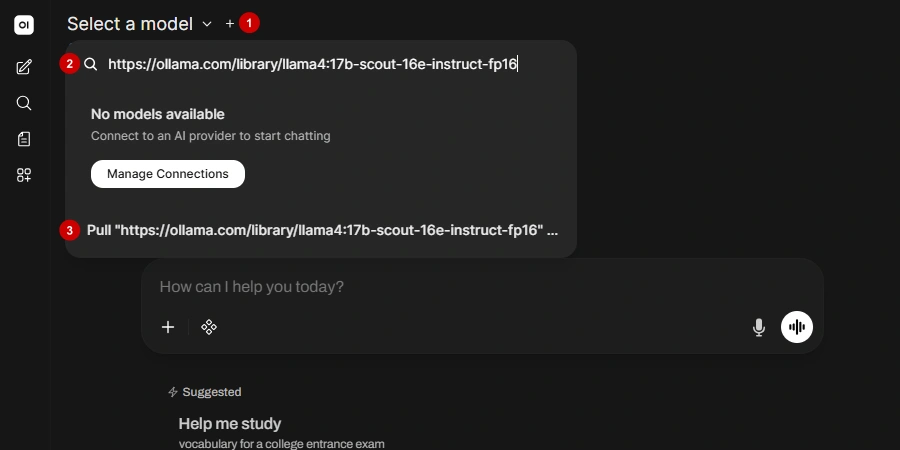 Your download will start.
A few good variants ordered from lightest to heaviest:
- https://ollama.com/library/deepseek-r1:1.5b
- https://ollama.com/library/deepseek-r1:7b
- https://ollama.com/library/deepseek-r1:8b
- https://ollama.com/library/deepseek-r1:14b
- https://ollama.com/library/deepseek-r1:32b
- https://ollama.com/library/deepseek-r1:70b
- https://ollama.com/library/deepseek-r1:671b
Step 6: Start chatting
Once the model downloads, you can start interacting with it. The first response will take significantly longer because the GPU is loading the model into memory.
Step 7: Use DeepSeek R1 with Coding Agents
Ollama supports launching popular coding agents with DeepSeek R1 as the backend:
# Claude Code
ollama launch claude --model deepseek-r1

# Codex App
ollama launch codex-app --model deepseek-r1

# OpenClaw
ollama launch openclaw --model deepseek-r1
NoteTo explore other local LLM tooling options, see our guides on running LM Studio and Unsloth.
Why Most Local Machines Can't Handle Full DeepSeek R1
The distilled R1 variants (7B through 70B) are excellent models, built by fine-tuning smaller architectures on R1's reasoning traces. There is a noticeable quality gap with the full 671B MoE on the hardest reasoning tasks, where the broader parameter pool matters.
A high-end RTX 4090 carries 24 GB of VRAM, covering the 32B distill at Q4, but falls far short of the full model's 376 GB requirement. The 671B model can technically run on 2x RTX 4090 plus large system RAM using Unsloth's 1.58-bit dynamic GGUF, but inference speed drops to around 2 tokens per second.
Thunder Compute Pricing vs DeepSeek R1 API Pricing
The DeepSeek R1 API costs $0.55/1M input tokens and $2.19/1M output tokens, far cheaper than OpenAI o1. But your data passes through DeepSeek's servers in China, a hard requirement blocker for many regulated workloads.
Running R1 on Thunder Compute via Ollama removes per-token costs entirely. You pay for GPU time only while the instance runs. A single A100 80GB on Thunder Compute starts at $1.09/hr, versus $5.03/hr on Google Cloud and $2.79/hr on Lambda. For the full 671B model, an 8x A100 cluster runs $11.92/hr on Thunder Compute.
| Option | Cost Model | Data Privacy | Model Quality |
|---|---|---|---|
| DeepSeek R1 API | $0.55 input / $2.19 output per 1M tokens | Data through DeepSeek servers (CN) | Full 671B |
| Local Ollama (32B distill, RTX 4090) | Hardware cost amortized (~$1,500-2,000 GPU) | Fully local | 32B distill |
| Thunder Compute + Ollama (1x A100) | $1.09-$1.57/hr1, no per-token cost | Fully self-hosted | 70B distill |
| Thunder Compute + Ollama (8x A100) | $11.92/hr, no per-token cost | Fully self-hosted | Full 671B |
| Google Cloud A100 | $5.03/hr | Fully self-hosted | Full 671B or 70B distill |
| Last reviewed on October 1, 2026. | |||
| 1Varies depending on vCPU and RAM configuration. | |||
Running R1 more than a few hours a week, or handling data that can't leave your infrastructure, makes self-hosting on Thunder Compute cheaper and more private than the DeepSeek API.
Ready to get started? Follow the Thunder Compute DeepSeek R1 guide to spin up an instance and run the full model with Ollama in minutes.
When Does Self-Hosting on Thunder Compute Make Sense?
For most users, the API is the better default; managed providers are cheaper per token, faster, and require no infrastructure work. Self-hosting makes sense for three specific scenarios:
- Data sovereignty: Regulated data (healthcare, legal, finance) that cannot leave your infrastructure requires a self-hosted deployment.
- Very high sustained throughput: At tens of millions of tokens per day with consistently high GPU utilization, the fixed hourly rate can undercut per-token pricing.
- Fine-tuning and custom weights: Modifying the model, merging adapters, or running a custom checkpoint requires direct access to the weights.
Last Thoughts on DeepSeek R1
DeepSeek R1 remains the strongest open-weight reasoning model available, with the distilled variants covering everything from a laptop to a high-end workstation, and Thunder Compute's pre-configured Ollama instances handling the full 671B model for teams that need it. Whether you start with ollama run deepseek-r1:7b or spin up an 8x A100 cluster, R1 is production-ready and MIT-licensed.
FAQ
What Is DeepSeek R1?
DeepSeek R1 is an open-weight, 671B-parameter reasoning model from a Chinese AI lab that uses chain-of-thought to solve complex logic tasks. Released in January 2025 under an MIT license, it was the first open-weight model to match OpenAI's o1.
How Much VRAM Do You Need to Run DeepSeek R1?
The 7B distill requires 4-5.5 GB (RTX 4060), the 32B distill requires 18-20 GB (RTX 4090), and the full 671B model demands approximately 376 GB across a multi-GPU setup. The full 671B model on Ollama supports a 160K context window, while all distilled variants use 128K.
How Do I Use DeepSeek R1?
Use DeepSeek R1 via free web chat, the pay-per-token API, or locally using Ollama or LM Studio. For local deployment, run ollama run deepseek-r1:7b. Thunder Compute offers pre-configured Ollama templates to run the full 671B model on cloud GPUs without expensive personal hardware.
Can DeepSeek Generate Images?
No, DeepSeek R1 cannot generate images. It is a strictly text-only language model with no multimodal input or output support. As of October 2026, no multimodal variant exists; use external tools like ComfyUI or DALL-E for image generation.
How Do I Fine-Tune DeepSeek R1?
Fine-tune DeepSeek R1 using its distilled variants (7B, 14B, 32B) with memory-efficient pipelines like Unsloth on a single A100 cloud GPU. Fine-tuning the full 671B model is impractical without a large multi-GPU cluster.
Is DeepSeek R1 Still Worth Using in 2026?
Yes, for reasoning-heavy tasks. DeepSeek has released V3.2 and V4 (April 2026) for general and coding workloads, but R1 remains the leading open-weight model for structured chain-of-thought reasoning. The R1-0528 update (May 2025) improved benchmarks significantly and added JSON output and function calling.
What Is the Difference Between DeepSeek R1 and DeepSeek V3?
V3 is a general-purpose chat model that answers directly, optimised for writing, translation, and Q&A. R1 is a reasoning model that works through problems step by step using visible <think> tags before responding. Use V3 for speed and breadth; use R1 for multi-step math, debugging, and logic.
Can I Run DeepSeek R1 on a Consumer GPU?
At Q4 quantization, distilled variants (7B through 70B) run on consumer GPUs from 4GB to 48GB VRAM. The full 671B model requires approximately 376GB of VRAM, needing at least 8x A100 80GB GPUs. A consumer RTX 4090 covers the 32B distill.