Llama 4 is the most capable open-weight model family shipped by Meta. Released on April 5, 2025, it introduced native multimodal understanding, a Mixture-of-Experts (MoE) architecture, and a 10M token context window.
This guide covers the full model lineup, benchmarks, VRAM requirements, and how to run Llama 4 with Ollama on a cloud GPU.
How Does Llama 4 Improve over Llama 3?
Llama 4 is Meta's fourth-generation family of open-weight LLMs. Unlike the text-only Llama 3, Llama 4 is natively multimodal, processing text, images, and video. The family was pretrained on over 30T tokens across 200 languages, doubling Llama 3's pre-training mix.
| Feature | Llama 3 | Llama 4 |
|---|---|---|
| Architecture | Dense Transformer | Mixture-of-Experts (MoE) |
| Modality | Text-only | Natively Multimodal (Text, Image, Video) |
| Context Window | 128K tokens | 1M-10M tokens |
| Training Tokens | ~15T (estimated) | >30T |
| Languages | Multilingual support | >100 languages |
| Knowledge Cutoff | December 2023 | August 2024 |
| Refusal Rate | Standard | <2% |
| Training Hardware | ~16,000 H100s | 32,000 H100s |
| Sources: Official release post, Llama 4 Model Card |
The architectural shift matters as much as the scale. Llama 3 was a dense text-only transformer with a 128K context window. Llama 4 replaces that with MoE layers, iRoPE positional embeddings, and FP8 precision training across 32,000 H100 GPUs, double the cluster used for Llama 3.
Llama 4 uses a MoE design where only a subset of parameters activates per token during inference. Models can carry far more total knowledge than a dense architecture would allow. Llama 4 also received 10x more multilingual training tokens than Llama 3, with a knowledge cutoff of August 2024 and refusal rates under 2%.
Llama 4 Release Date and Context Window Size
Llama 4 Scout and Llama 4 Maverick launched publicly on April 5, 2025. They are available via the official Meta website and Hugging Face under the Llama 4 Community License, allowing free use for products with fewer than 700M monthly active users.
The Llama 4 Model Lineup
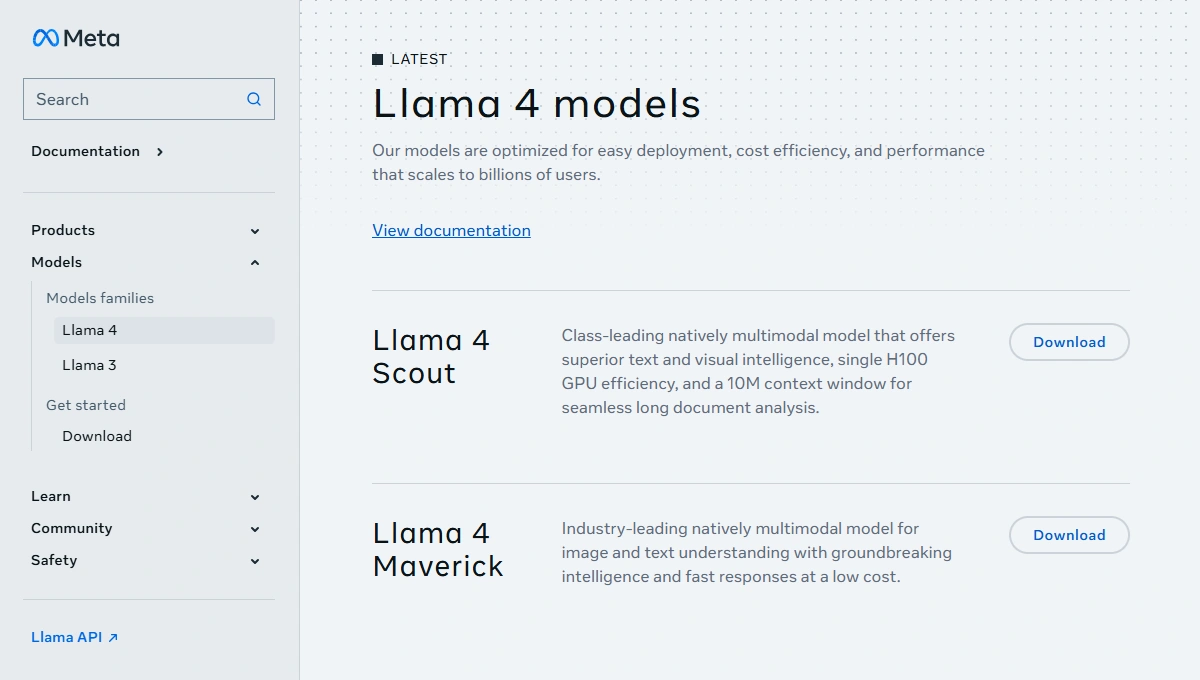
Llama 4 consists of three models: Scout, Maverick, and Behemoth. Scout and Maverick are publicly available. Behemoth is unreleased but served as the teacher model for the other two through codistillation.
| Feature | Llama 4 Scout | Llama 4 Maverick | Llama 4 Behemoth |
|---|---|---|---|
| Total Parameters | 109B | 400B | ~2T |
| Active Parameters | 17B | 17B | 288B |
| Expert Count | 16 Experts | 128 Experts | 16 Experts |
| Max Context Window | 10M tokens | 1M tokens | Not Publicly Specified |
| Primary Use Case | Long-context retrieval & document analysis | General reasoning, coding & assistant tasks | Teacher/Distillation model & Advanced STEM |
| Deployment Status | Generally Available | Generally Available | Research Preview (Not Publicly Released) |
Llama 4 Scout: Parameters and Hardware Requirements
Llama 4 Scout is the accessible member of the family. It has 17B active parameters across 16 experts, with 109B total parameters, pretrained on approximately 40T tokens.
The 10M token context window suits repository-level code analysis, multi-document summarization, and other long-context tasks. The usable context size depends on available VRAM; 32K to 128K is a realistic working window on consumer hardware.
Scout is the most practical model for self-hosting, though VRAM requirements are higher than a comparable dense model because all expert weights must reside in memory. At Q4_K_M quantization, Scout needs approximately 55GB of VRAM, fitting on an A100 80GB. Unsloth's 1.78-bit dynamic GGUF reduces this to around 24GB, making a single RTX 4090 or RTX 5090 viable. To fine-tune Scout using QLoRA and Unsloth, see the Thunder Compute guide to fine-tuning Llama 4 Scout on an A100 80GB.
Llama 4 Maverick: Parameter Size, Benchmarks, and Release Date
Llama 4 Maverick launched on April 5, 2025 alongside Scout. It shares Scout's 17B active parameters per token but routes through 128 experts instead of 16, for 400B total parameters pretrained on approximately 22T tokens. That larger knowledge base explains why Maverick outperforms Scout on reasoning, coding, and multimodal tasks at the same inference cost.
An experimental, chat-optimized version of Maverick scored an ELO of 1417 on LMArena at launch. As reported by The Register and confirmed by Meta, this was a non-public variant and the public model scored approximately 1370 ELO. Regardless, it beats GPT-4o and Gemini 2.0 Flash on multimodal and reasoning benchmarks, and matches DeepSeek V3 on coding while activating fewer parameters.
Maverick's FP8 quantized weights fit on a single H100 DGX host, making it a viable production choice for cloud GPU users.
Llama 4 Behemoth: What We Know So Far
Llama 4 Behemoth was previewed alongside Scout and Maverick in April 2025 but was still in training at the time of the public release. It was designed with approximately 2T total parameters and 288B active parameters across 16 experts.
Behemoth was never publicly released. It served as a teacher model for Scout and Maverick, and Meta's subsequent launch of Muse Spark in April 2026, a closed-weight model from the newly formed Meta Superintelligence Labs, marked a strategic shift away from the open-weight frontier approach of the Llama 1-4 generations. The existing Scout and Maverick weights remain available and unchanged.
Llama 4 Scout vs Maverick: Which Should You Run?
Choosing between Scout and Maverick comes down to hardware and use case:
- Scout if you need a very long context window (10M tokens is unique among locally runnable models) or your GPU has under 80GB of VRAM.
- Maverick if you need higher output quality on reasoning, coding, and multimodal tasks and have access to a multi-GPU setup.
For most individual developers, Scout on a single GPU or a Thunder Compute A100 instance is the practical starting point. Teams building production-grade assistants or inference APIs will find Maverick worth the extra compute, given its benchmark parity with GPT-4o at a fraction of the API cost.
Llama 4 Benchmarks: How Does It Compare?
Benchmark comparisons for Llama 4 require careful reading. Meta's internal benchmarks used model variants that differed from the ones publicly released, and the AI landscape has shifted considerably since April 2025. The comparisons below reflect the public models against the competitors they were benchmarked against at launch.
| Model | Active Params | Context Window | Multimodal | Open Weight | LMArena ELO |
|---|---|---|---|---|---|
| Llama 4 Scout | 17B (109B total) | 10M tokens | Yes | Yes | N/A |
| Llama 4 Maverick | 17B (400B total) | 1M tokens | Yes | Yes | ~1370 (public model)1 |
| GPT-4o | ~200B (est.) | 128K tokens | Yes | No | ~1380 |
| Gemini 2.0 Flash | Unknown | 1M tokens | Yes | No | ~1350 |
| Llama 3.1 405B | 405B (dense) | 128K tokens | No | Yes | ~1260 |
| 1 An experimental chat-optimized variant scored 1417 at launch; the publicly released model weights score approximately 1370. ELO scores as of April 2025 from LMArena. Active parameter counts for closed models are estimates. | |||||
Llama 4 vs ChatGPT
Maverick benchmarks comparably to GPT-4o across multimodal, reasoning, and coding tasks, while costing significantly less to run via API. Maverick's DocVQA score of 94.4 and its MATH performance suggest near-parity on the tasks GPT-4o has historically led. The key difference is deployment freedom: Llama 4 weights are downloadable and self-hostable, while ChatGPT is a closed API with no ability to fine-tune the base weights or run inference on your own infrastructure.
Llama 4 vs Gemini
Maverick outperforms Gemini 2.0 Flash on Meta's benchmarks in multimodal and reasoning tasks. Gemini 2.5 Pro narrows or reverses that gap on several tasks, but it comes with a substantially higher per-token cost and no self-hosting option. For teams that want to run inference privately or tune the model on proprietary data, Llama 4 offers something neither Gemini model can match.
Llama 4 vs Llama 3
The improvement from Llama 3 to Llama 4 represents a different class of model, not a straightforward upgrade. Llama 3's best open-weight option had a 128K context window, no native multimodal capability, and a December 2023 knowledge cutoff. Llama 4 Scout beats it on multimodal benchmarks despite fewer total parameters, fitting on a single GPU with quantization. On LiveCodeBench, Maverick scores 43.4 versus Llama 3.1 405B's 27.7, a 57% relative improvement on real-world coding tasks.
Running Llama 4 locally is feasible for Scout on high-end consumer hardware, but Maverick requires server-grade GPUs. Thunder Compute provides on-demand access to A100 and H100 instances at cost-effective prices.
How Much VRAM Do You Need for Llama 4?
Unlike dense models, all MoE expert weights must reside in VRAM even though only 17B parameters activate per token, so VRAM requirements track total parameters, not active parameters. The table below covers the most practical configurations.
| Model | Quantization | VRAM Required1 | Recommended Hardware |
|---|---|---|---|
| Llama 4 Scout | Q4_K_M (4-bit) | ~55GB | A100 80GB, H100 80GB |
| Llama 4 Scout | 1.78-bit (Unsloth dynamic GGUF) | ~24GB | RTX 4090, RTX 5090 |
| Llama 4 Scout | Q8_0 (8-bit) | ~110GB | 2x A100 80GB |
| Llama 4 Maverick | Q4_K_M (4-bit) | ~200GB | Multi-GPU / H100 host |
| Llama 4 Maverick | 1.78-bit (Unsloth quant) | ~100GB | 2x H100 80GB |
| Llama 4 Scout (CPU only) | Q4_K_M | 32GB system RAM | CPU offload (very slow) |
1 VRAM figures vary with context size. KV cache overhead grows with longer context windows.
Sources: Unsloth documentation,
VRLA Tech LLM VRAM guide.
For a full GPU-by-workload comparison and cloud pricing breakdown, see the Thunder Compute guide to the best GPU for LLM work.
Llama 4 Multimodal Image Input Limits
Both Scout and Maverick support up to 5 input images per prompt. Image understanding is English-only, regardless of text language, meaning a prompt in French with an attached image will process the text in French but analyze the image in English. Developers building multilingual multimodal pipelines should factor this constraint in from the start.
How to Install and Run Llama 4 on a Thunder Compute GPU
Thunder Compute provides pre-configured Ollama instance templates that handle GPU driver setup, Ollama installation, and model configuration. You can have a Llama 4 model answering prompts in a few minutes.
To go deeper into local LLM tooling options, see our guides on running LM Studio and Unsloth.
Step 1: Install the Thunder Compute CLI
Download and install tnr for Windows, or macOS.
Run this command for Linux:
curl -fsSL https://raw.githubusercontent.com/Thunder-Compute/thunder-cli/main/scripts/install.sh | bash
Step 2: Login
tnr login
Step 3: Launch and connect to an Ollama instance
tnr create --template ollama
Pick the hardware configuration for your instance.
Step 4: Connect to your instance
tnr connect 0
Start the Ollama UI. This will take around a minute. Once it's done loading, click the link provided by the terminal to open Ollama in a browser. You'll be prompted to create an account.
start-ollama
Step 5: Load the desired model
- In the Ollama UI, click "Select a model".
- Add the URL of the model from the Ollama page.
- Click "Pull [MODEL_URL]" in the dropdown.
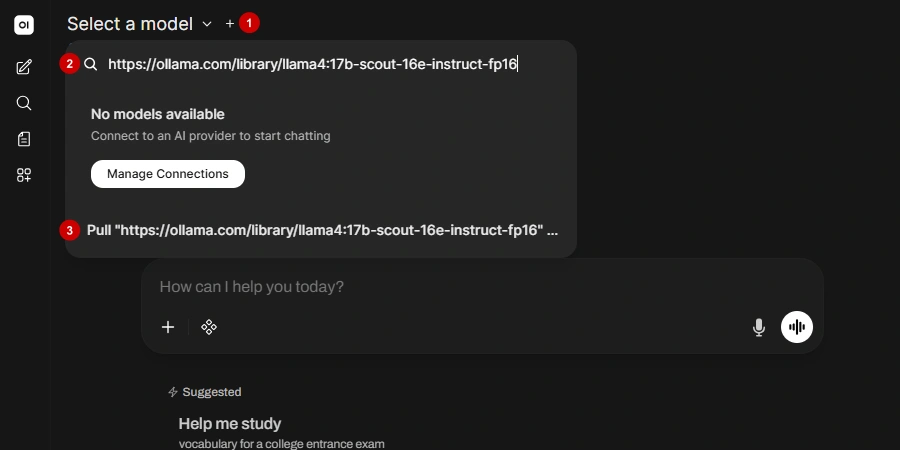 Your download will start.
A few good variants ordered from lightest to heaviest:
- https://ollama.com/library/llama4:17b-scout-16e-instruct-q4_K_M
- https://ollama.com/library/llama4:17b-scout-16e-instruct-q8_0
- https://ollama.com/library/llama4:17b-scout-16e-instruct-fp16
- https://ollama.com/library/llama4:17b-maverick-128e-instruct-q4_K_M
- https://ollama.com/library/llama4:17b-maverick-128e-instruct-q8_0
- https://ollama.com/library/llama4:17b-maverick-128e-instruct-fp16
Step 6: Start chatting
Once the model is downloaded you can start interacting with it. The first response will take significantly longer because the GPU is loading the model into memory.
Last Thoughts on Llama 4
Llama 4 Scout and Maverick remain the strongest open-weight multimodal models available, with Scout offering a uniquely long context window and Maverick delivering GPT-4o-class performance with full self-hosting freedom. Thunder Compute's multi-GPU A100 80GB and H100 instances are pre-configured with Ollama and ready in under a minute.
FAQ
Is Llama 4 Free to Use?
Yes, under the Llama 4 Community License. Organisations with fewer than 700M monthly active users can download, fine-tune, and deploy the weights at no cost. Larger organisations must obtain a separate commercial license from Meta.
What is Llama 4 Scout?
Scout is Meta's efficiency-focused Llama 4 model with 17B active parameters across 16 experts and 109B total parameters, pretrained on approximately 40T tokens. Its defining feature is a 10M token context window, the largest of any publicly available model at its size class.
How Much VRAM Do I Need for Llama 4?
Scout requires approximately 55GB at Q4_K_M quantization because all 109B expert weights must be loaded. Unsloth's 1.78-bit dynamic GGUF reduces this to around 24GB. Maverick needs approximately 200GB at Q4 and is best run on a multi-GPU cloud instance.
What is the Difference Between Llama 4 Scout and Maverick?
Scout has 109B total parameters across 16 experts and a 10M token context window. Maverick has 400B total across 128 experts and a 1M token context window. Maverick delivers higher quality on reasoning, coding, and multimodal tasks; Scout is the practical self-hosting choice due to lower VRAM requirements.
How Does Llama 4 Compare to ChatGPT (GPT-4o)?
Maverick benchmarks comparably to GPT-4o on multimodal and reasoning tasks, with a DocVQA score of 94.4. Unlike ChatGPT, Llama 4 weights are downloadable and self-hostable with no dependency on a closed API.
Can I Run Llama 4 Locally?
Scout is feasible on a single RTX 4090 or RTX 5090 using Unsloth's 1.78-bit GGUF. Standard Q4_K_M requires approximately 55GB, fitting on an A100 80GB. Maverick requires a multi-GPU setup and is best run on a cloud instance.
What Happened to Llama 4 Behemoth?
Behemoth was never publicly released. It served as the teacher model for Scout and Maverick through codistillation. In April 2026, Meta launched Muse Spark, a closed-weight frontier model, marking a departure from the open-weight Llama approach. Scout and Maverick weights remain available and unchanged.
Does Llama 4 Support Image Input?
Yes. Both Scout and Maverick support up to 5 input images per prompt. Image understanding is English-only, even though text input supports 12 languages. Video was part of training data but is not supported as a runtime input modality.
What is the Llama 4 Knowledge Cutoff?
Both Scout and Maverick have a knowledge cutoff of August 2024, per the official Meta model card. This represents a significant improvement over Llama 3's December 2023 cutoff.
How Do I Run Llama 4 on a Cloud GPU?
Thunder Compute provides a pre-configured Ollama template. Install the tnr CLI, run tnr create --template ollama, connect with tnr connect 0, and pull your chosen model variant via the Ollama UI. Instances spin up in under a minute with CUDA and Ollama pre-installed.